Sunday, April 23, 2017
How to install windows 8
How to install windows 8
I show for this video how can install windows 8. ?
http://www.mediafire.com/watch/8g5ou7l4lahysfn/001.%20Installing%20Windows%208.mov
Thanks for showing .?
Available link for download

Sunday, April 16, 2017
How to Customize Pen Drive as Ram Memory in Windows 7
How to Customize Pen Drive as Ram Memory in Windows 7
Programs that require lots of memory may not run smoothly , if your PC has a low memory. To avoid this make your pen drive/USB of large size as RAM, which will make your system faster. It can be possible with any kind of Windows operating system, all you need is a pen drive of minimum 1GB memory ,better to prefer 4GB.To know how to do this, follow below steps.

1.Format your Pen Drive first
2.. Insert the Pen Drive with 1GB at least in the USB port, Wait for the PC to detect the pen drive.
3. Right click on My Computer--> Properties.
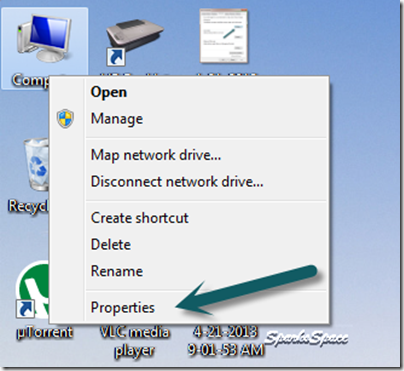
4. Select Advanced System Settings.

5. Select Advanced—> Performance –>Settings

6. Under Performance Options Select Advanced –>Virtual memory Change

7. Uncheck Automatically manage paging file size for all drives Click on Custom Size.Select your Pen Drive . Enter the same in the Initial and Max columns in the Custom Size .The size depends upon your free memory capacity of your pen drive. So you can change this limit according to your pen drive size.

8. Click on Set button, then click on OK.

9. Now restart your PC.Finally check the general start up time and also speed of your PC.This trick will surely improve the performance of your computer and increase operational speed in low cost.
Available link for download
Saturday, April 15, 2017
Home8 like Windows 8 Launcher v3 1 Apk
Home8 like Windows 8 Launcher v3 1 Apk
Home8+like Windows 8 Launcher v3.1 Apk - Only Windows 8 style Launcher with real live tiles - Gmail, twitter, facebook, calendar, news, weather, stock market etc.
You may try free version before buying
Tired of having same User interface on your android device ?
Do you want tile based User interface (like Windows 8 ) and power of Android on one device then try Home8 + Launcher.
This Launcher
Available link for download
Thursday, April 13, 2017
how to make a bootable USB Windows 7 and other Windows versions
how to make a bootable USB Windows 7 and other Windows versions
Free software that we will use to create a bootable USB this time it was Rufus.
1. Rufus is very light and most rapidly than software like. The file size was very small, only about 400 KB only.
2. Easy to use to create a bootable USB from a bootable ISO file (Windows, Linux, etc.)
3. It has a variety of other functions such as low-level utility, flash the BIOS or other firmware.
4. Download Rufus
Download Rufus 1.1.3
5. Make sure the USB drive has been installed on your computer, then run rufus_v1.1.3f.exe
6. Make sure you check the "Create a Bootable Disk Using". If you want to create a bootable USB Windows 7 or any other version, use the "ISO Images" as the source. Then click the browse button that is next to it.
7.Pilih ISO file you want and click "Open".
8.Klik start to begin to create a bootable flash.
its easy right ...
Available link for download
Tuesday, March 21, 2017
How To Activate Adobe Photoshop CS6 Full Version Free Windows
How To Activate Adobe Photoshop CS6 Full Version Free Windows
 |
| Adobe Photoshop CS6 Crack |
Step 2: Disconnect your Internet Connection & disable Anti-virus software.
Step 3: Open the downloaded Adobe Photoshop CS6 & then a windows will appear to activation. Click on Connect Later & close the program.
Step 4: Now download amtlib.dll to your pc through the below download link.
- UserCloud Download Link
- Indishare Download Link
Step 6: Copy the amtlib.dll as a replacements into Photoshop CS6 folder installed: C:Program FilesAdobeAdobe Photoshop CS6
Step 7: Now download the patch file (Adobe Photoshop cs6-patch.exe) through the below link.
- UserCloud Download Link
- Indishare Download Link
Step 9: Now right Click on Adobe.photoshop.cs6-patch.exe & Run as administrator.
Step 10: Add IPs into the host file to avoid "CD key & License requirements"
Step 11: Open the "etc folder" to get "hostfile" by following direction C:WindowsSystem32Driversetc.
Step 12: Now right click on HostFile->Open With->Choose Notepas & add the IPs list into & click on Save. You have done Successfully. Enjoy

Available link for download
Sunday, March 19, 2017
Hack Windows 7 Login Password with Default Windows 7 Administrator Account
Hack Windows 7 Login Password with Default Windows 7 Administrator Account
Restart the computer then follow next steps:
1. Press on the F8 key while you start Windows 7 until your PC displays the boot menu.
2. Select Safe Mode option and press the Enter key
3. Then a login box appears, click on Administrator in the username box and leave the password field as blank, click on OK to login.
4. Now you can open Control Panel, then in User Accounts you can reset any user password easily.
Available link for download
Sunday, March 12, 2017
HOW TO ACTIVATE WINDOWS 8 1
HOW TO ACTIVATE WINDOWS 8 1
HOW TO ACTIVATE WINDOWS 8.1 PERMANENT IN SIMPLE STEPS

Available link for download
Monday, February 27, 2017
Hacking Windows XP
Hacking Windows XP
Hack to Change Windows XP Home to Windows XP Professional Enable the features found in Windows XP Professional on your Windows XP Home Edition installation with this hack. It will allow you to turn your Windows XP Home CD into a Windows XP Profrssional CD.
1. Copy the root directory and the i386 directory of the WindowsXP CD to your hard drive.
2. Extract the Bootsector of your Windows XP CD.
3. Click START>RUN>REGEDIT
4. Highlight HKEY_LOCAL_MACHINE
5. Click FILE>LOAD HIVE and select the Setupreg.hiv file This file is located on your Windows XP CD in the i386 folder.
6. Locate the following registry key: HKEY_LOCAL_MACHINEHomekeyControlSet001Servicessetupdd
7. Edit the DEFAULT key and change the following values: 01 to 00 02 to 00
8. Change the name to the value HOMEKEY to anything.
9. Locate the following registry key: HKEY_LOCAL_MACHINEHomekeyControlSet001Servicessetupdd Edit the DEFAULT key and change the following values: 01 to 00 02 to 00
10. Highlight HOMEKEY and select FILE>UNLOAD HIVE
You can now burn the data on your hard drive to a CD. Then use the CD to install Windows XP. Be sure to make the CD bootable. You can use the instructions here to help you do that.
Available link for download
Tuesday, February 14, 2017
Hack Windows using winAUTOPWN 3 4 –Completing 4 years of windows hacking
Hack Windows using winAUTOPWN 3 4 –Completing 4 years of windows hacking
winAUTOPWN has been an old favourite to automate windows hacking and vulnerability testing. The project is the brainchild of Azim Poonawala of [C4]Closed Circuit Corporate Clandestine and saw its first release in 2009. Fast forward to 4 years; it has matured into a good exploitation framework with a plethora of options. As the Author states about it -
Autohack your targets - even if you have consumed and holding a bottle of ABSOLUT in one hand and absolute ease (winAUTOPWN) in the other.
In layman terms, winAUTOPWN is a unique exploit framework which helps in gaining shell access and pwning (aka exploiting vulnerabilities) to conduct Remote Command Execution, Remote File/Shell Upload, Remote File Inclusion and other Web-Application attacks. To add cherry on the top, it can also help in conducting multiple types of Denial of Service attacks on targets, furthermore, It can also be used to test effectiveness of IDS/IPS and other monitoring sensors/softwares.

You can -
- Download winAUTOPWN from here / mirror
- Read its documentation from here
Available link for download
Monday, February 13, 2017
Google Earth Offline Installer Latest Version Free Download v7 1 5 or later for Windows Mac and Linux
Google Earth Offline Installer Latest Version Free Download v7 1 5 or later for Windows Mac and Linux
Google Earth Offline Installer free Latest for Windows, Mac, and Linux :
About Google Earth:
- License : Freeware
- Publisher : Google
- Windows OS : Windows XP, Vista, 7, 8
- MAC : Mac OS X 10.6.0 or later
- Linux : LSB 4.0 standard base

Available link for download
Thursday, February 9, 2017
Home8 like Windows 8 Launcher v3 1 1 Apk
Home8 like Windows 8 Launcher v3 1 1 Apk
Home8+ like Windows 8 Launcher v3.1.1 Apk - Only Windows 8 style Launcher with real live tiles - Gmail, twitter, facebook, calendar, news, weather, stock market etc.
You may try free version before buying
Tired of having same User interface on your android device ?
Do you want tile based User interface (like Windows 8 ) and power of Android on one device then try Home8 + Launcher.
This
Available link for download
Saturday, January 28, 2017
How to Create Windows Partition Backup using Ghost 11 5
How to Create Windows Partition Backup using Ghost 11 5
Ghost 11.5 is an incredible tool that one can use to create full partition backup of its C Drive or any other drive no matter, you could easily compress your whole drive with settings and software's installed on it. So now anytime you feel your window is working slow or you found some serious issues using it well you can restore it to that particular backup time using Symantec Ghost Solution Suite 11.5
Available link for download
Friday, January 13, 2017
How to change the default directory of windows explorer
How to change the default directory of windows explorer
 When you open Windows Explorer (by choosing the Window key and "E" simultaneously or by choosing Start, all Programs, Accessories, Windows Explorer), you can change the directory that appears by default. If you choose Start, all Programs, Accessories, and then right-click on Windows Explorer and choose Properties, you can modify the "Target" directory. To go to your C: drive, type simply C: in the Target box and choose OK. You can also enter a shortcut key on this screen, telling Windows the character or combination of characters you want to type to automatically open Windows Explorer. You can even change the icon or specify that you always want Explorer to open up in full-screen mode.
Available link for download
Monday, January 9, 2017
How to Create a Folder on Start Screen of Your Windows Phone
How to Create a Folder on Start Screen of Your Windows Phone
Windows Phones are being loved by many users due to its UI magazine style. However, it is not much popular comparative to Android or iOS. There are many customizations and adding which you can done with your Windows Phone.
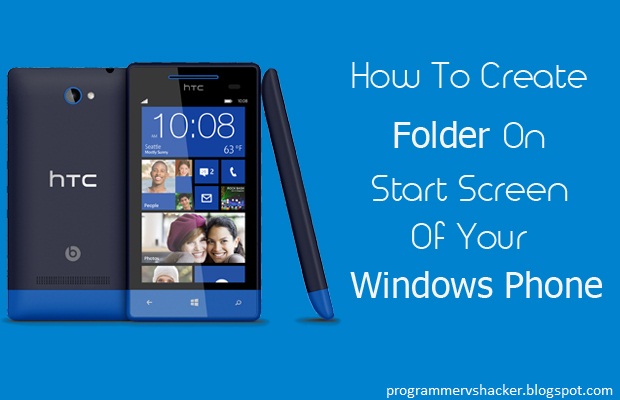
Learn-How to Create a Folder on Start Screen
- First of all you are supposed to press and hold Tile from the Start Screen (Main Screen)
- Afterwards, the tile will pop up, now drag that pop up to you favorite position on the Start Screen, where you want to place your folder.
- Then you have to tap on Name Folder to give a name to your folder, after giving the name to your folder tap on Enter
- To add more folders, you have to follow the same steps mentioned above
- Now, you can tap on your folder to open it and can include your favorite stuffs in it
- Congratulations! You have successfully created a Folder
Conclusion
Available link for download
Thursday, January 5, 2017
Google Music Desktop Player for Windows 7
Google Music Desktop Player for Windows 7

Google Music Desktop Player Features:
- Uses Webkit Engine
- Supports Multimedia Keys (Play, Pause, Stop, Previous and Next)
- Windows 7 Taskbar support (Buttons for: Play, Pause, Previous and Next)
- MiniPlayer
- Metro UI with Aero Snap support
Download Google Music Desktop Player for Windows 7
Available link for download
Monday, December 26, 2016
How To Add Complete Material Design To Google Chrome On Windows Desktop
How To Add Complete Material Design To Google Chrome On Windows Desktop
Google is adding the material design to every Android app and slowly to the Windows version of it Chrome browser. Though, its not yet completely rolled out to main channel of Chrome, you can try them now by changing few chrome flags.
Read more > >
Available link for download
Wednesday, December 7, 2016
How to Change Folder Icon in Windows 7
How to Change Folder Icon in Windows 7
How to Change Folder Icon in Windows 7
Available link for download
Wednesday, November 30, 2016
How to backup and restore your windows registry
How to backup and restore your windows registry
 Registry is an important part in your system.Whenever your are doing any editings to the regsitry and if any error occurs it will effect your system very badly.Also if you ran a registry scan with unregistered softwares ,there is a chance that it will delete some important keys from your registry so that you are forced to buy that softwares full version.Please keep in mind that these are tricks by those software companies to force you buy their full versions.In that cases best solution is to back up your registry before running any such registry scans .You can do this simply no extra softwares needed.just export all your registry keys.here is the steps to back up and later restore your registry
How to Export Registry Keys
Click Start, and then click Run ( window + r )
In the Open box, type regedit, and then click OK.
On the File menu, click Export.
In the Save in box, select the boxs at the bottom the bottom according to whether you want to export all or only selected branches of the registry.
Next select a location in which to save the backup .reg file. In the File name box, type a file name, and then click Save.
How to Restore the Registry
To restore registry keys that you exported, double-click the .reg file that you saved.
Available link for download
Monday, November 21, 2016
How to lock desktop icons in windows
How to lock desktop icons in windows
 This is a simple trick to lock your desktop icons,so that no one change or alter your personal desktop screen.There may be cases like, You have arranged your desktop to look nicely with your wallpaper and arranged all the icons in a well manner,and some one come and mess up the nice arrangement. To avoid these situations you should lock your desktop icons,after arranging all the icons and setting your wallpaper.You need to add some registry keys to lock your screen.Ok now we can start our trick.
1. Start run ( window + r ) and type regedit
2. Navigate to the following key
HKEY_CURRENT_USERSoftwareMicrosoftWindowsCurrentVersionPoliciesExplorer.
3. Right-click in the right pane and select New, DWORD Value name NoSaveSettings and press the Enter key.
4. Right-click on the new NoSaveSettings item and select Modify. Enter 1 in the Value data box. After this, whenever you restart Windows, your settings will return to their current state.
Available link for download