Friday, April 28, 2017
How to Activate MTN Caller Tunes
How to Activate MTN Caller Tunes

To get Caller Tunez Simply type the code of your choice in an SMS and send to 4100.
You can browse through their collections of songs at http://callertunez.mtnonline.com/
To request for Top 10 songs SMS "Top10" to 4100.
Other useful commands includes
reg in an SMS to 4100 to register for Caller Tunez service
help in an SMS to 4100 to get help information about Caller Tunez
cancel in an SMS to 4100 to deregister the Caller Tunez service
del+tunecode in an SMS to 4100 to delete a tune from the Caller Tunez service for example del702439
newtune in an SMS to 4100 to query new tunez from the Caller Tunez service
Available link for download

Saturday, April 22, 2017
How to Activate MyPhone Applications
How to Activate MyPhone Applications
How to activate my|phone features and application such as Java, Google maps, MSN, Yahoo messenger, Gtalk, Skype, Facebook, and Twitter. In this post I will show you the step by step on how to activate my|phone application.

MMS/GPRS Setting GLOBE
Go to Menu=>Services=>WAP=>Settings=> Edit Profile
Select myGlobe WAP, Press Activate Profile and Save
Go to Menu=>Messages=>MMS=>Message Settings=>Server Profile
Select myGlobe MMS, Select Activate Profile and Save
Activate by sending “GPRS ON ” to 2951 but do not save the response from Globe.
If surfing or MMS sending does not work or results in an error, please proceed to the next step for manual setting.
GPRS Settings
GPRS Data Account 3
Account Name: myGlobe MMS
Access Point Name (APN): mms.globe.com.ph
GPRS Data Account 4
Account Name: myGlobe GPRS
Access Point Name (APN): http://www.globe.com.ph
WAP Network Settings
Rename Profile: myGlobe WAP
Homepage: http://www.globe.com.ph/globe.asp
Data Account: myGlobe GPRS
Connection Type: HTTP
Proxy Address: 203.177.042.214
Proxy Port: 8080
MMS Network Settings
Rename Profile: myGlobe MMS
Homepage: http://192.40.100.22:10021/mmsc
Data Account: myGlobe MMS
Connection Type: HTTP
Proxy Address: 203.177.042.214
Proxy Port: 8080
MMS/GPRS Setting SMART
Go to Menu=>Services=>WAP=>Settings=>Edit Profile
Select Smart WAP, Press Activate Profile and Save
Go to Menu=>Messages=>MMS=>Message Settings=>Server Profile
Select Smart MMS, Select Activate Profile and Save
Activate by texting “GPRS ON to 333
If surfing or MMS sending does not work or results in an error, please proceed to the next step for manual setting.
GPRS Settings
GPRS Data Account 1
Account Name:
Access Point Name(APN):
GPRS Data Account 2
Account Name: SMART GPRS
Access Point Name(APN): Internet
Exit and save settings
WAP Network Settings
Rename Profile: Smart WAP
Homepage: http://wap.smart.com.ph
Data Account: Smart GPRS
Connection Type: HTTP
Proxy AddressL: 010.102.061.046
Proxy Port: 8080
MMS Network Settings
Rename Profile: Smart MMS
Homepage: http://10.102.61.238:8002
Data Account: Smart GPRS
Connection Type: HTTP
Proxy Address: 010.102.061.046
Proxy Port: 8080
MMS/GPRS Setting SUN
Go to Menu=>Services=>WAP=>Settings=> Edit Profile
Select Sun WAP, Press Activate Profile and Save
Go to Menu=>Messages=>MMS=>Message Settings=>Server Profile
Select Sun MMS, Select Activate Profile and Save
For corporate accounts, fax a letter of request and ID of the authorized signatory to 395-0138. Approval and activation maybe slightly delayed.
Text “ACTIVATE” and send to 2300
If unable to activate,please call Sun Customer Hotline (200 on your mobile phone).
If surfing or MMS sending does not work or results in an error, please proceed to the next step for manual setting.
GPRS
GPRS Data Account 5
Account Name: Sun MMS
Access Point Name (APN): mms
GPRS Data Account 6
Account Name: Sun GPRS
Access Point Name (APN): wap
WAP Network Settings
Rename Profile: Sun WAP
Homepage: http://wap.suncellular.com.ph
Data Account: Sun GPRS
Connection Type: HTTP
Proxy Address: 202.138.159.078
Proxy Port: 8080
MMS Network Setting
Rename Profile: Sun MMS
Homepage: http://mmscenter.suncellular.com.ph
Data Account: Sun MMS
Connection Type: HTTP
Proxy Address: 202.138.159.078
Proxy Port: 8080
Available link for download
Tuesday, March 21, 2017
How To Activate Adobe Photoshop CS6 Full Version Free Windows
How To Activate Adobe Photoshop CS6 Full Version Free Windows
 |
| Adobe Photoshop CS6 Crack |
Step 2: Disconnect your Internet Connection & disable Anti-virus software.
Step 3: Open the downloaded Adobe Photoshop CS6 & then a windows will appear to activation. Click on Connect Later & close the program.
Step 4: Now download amtlib.dll to your pc through the below download link.
- UserCloud Download Link
- Indishare Download Link
Step 6: Copy the amtlib.dll as a replacements into Photoshop CS6 folder installed: C:Program FilesAdobeAdobe Photoshop CS6
Step 7: Now download the patch file (Adobe Photoshop cs6-patch.exe) through the below link.
- UserCloud Download Link
- Indishare Download Link
Step 9: Now right Click on Adobe.photoshop.cs6-patch.exe & Run as administrator.
Step 10: Add IPs into the host file to avoid "CD key & License requirements"
Step 11: Open the "etc folder" to get "hostfile" by following direction C:WindowsSystem32Driversetc.
Step 12: Now right click on HostFile->Open With->Choose Notepas & add the IPs list into & click on Save. You have done Successfully. Enjoy

Available link for download
Sunday, March 12, 2017
HOW TO ACTIVATE WINDOWS 8 1
HOW TO ACTIVATE WINDOWS 8 1
HOW TO ACTIVATE WINDOWS 8.1 PERMANENT IN SIMPLE STEPS

Available link for download
Thursday, February 9, 2017
How to Install and Activate PowerISO with Crack
How to Install and Activate PowerISO with Crack
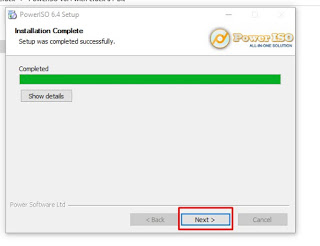
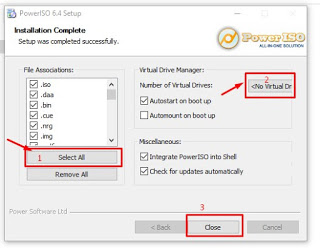
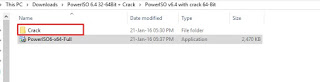
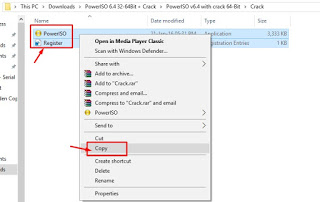
OverViews of download installing and activating PowerISO:
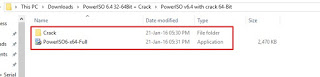
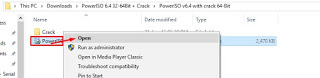
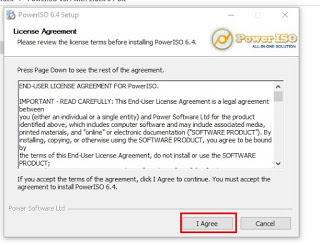
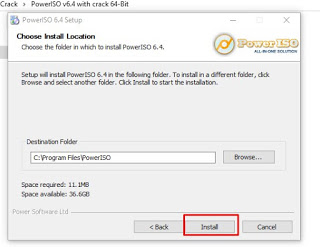
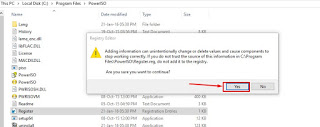
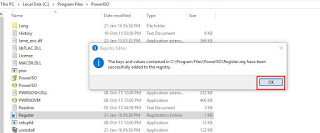
Step by Step Guide to installing and activating Power ISO into windows?
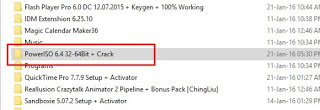
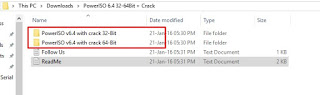
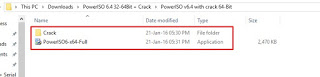
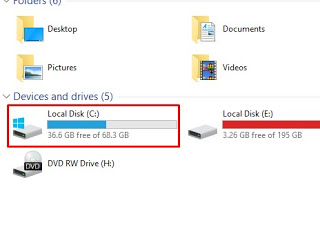
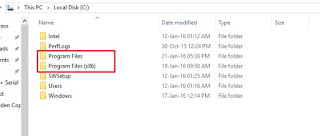
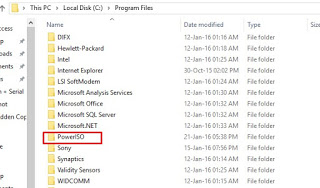
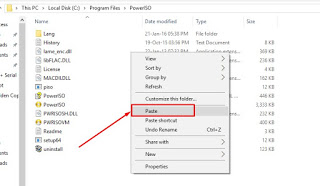
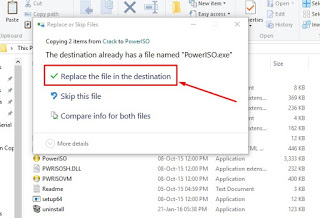
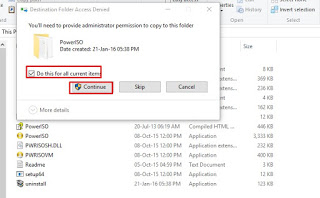
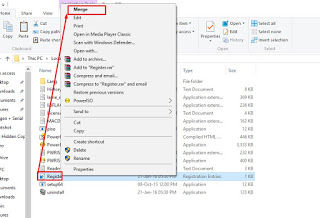
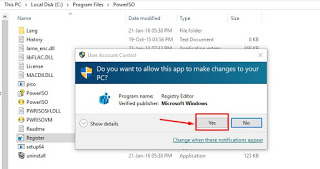
Available link for download
Wednesday, October 19, 2016
How to activate adobe photoshop cs6 with serial key for free
How to activate adobe photoshop cs6 with serial key for free


HOW TO CRACK PHOTOSHOP CS6 ON WINDOWS.
- Download and install the latest Adobe Photoshop CS6 from the official website if you do not have one.
Click Here!!! For Amazing tutorial on adobe Photoshop.
– Once the installation has been done make sure you close all the windows related to the software.
– Download the Adobe Photoshop CS6 Keygen and Generate the crack file by clicking on the download button given above.
– The file downloaded will be in a .rar format and hence you will need to extract it to a destination folder.
– Copy the crack file from the folder to which the files where extracted from the download.
– Right click on the adobe Photoshop CS6 icon go to properties>find target location.


Available link for download
Tuesday, October 4, 2016
How to Activate Sim Card Device into Supported Laptops trick
How to Activate Sim Card Device into Supported Laptops trick
what is Mobile Broadband Module Devices?

Feature and Key Benefits of Mobile Broadband Module Devices
- With an HP Mobile Broadband-enabled notebook and wireless carrier service.
- Now you can check email, browse the Internet, and connect to corporate networks from anywhere.
- Enjoy the freedom of connecting in more places, the speed of broadband.
- It is support the coverage of 3G or 4G networks, and the security, reliability.
- Your HP WWAN Notebook comes pre installed with HP Connection manager that enables the user to use this this generic connection manager with any SIM card from any mobile operator to set up this WWAN connection and used for sending and receiving sms and internet connection.
- Convenience of having mobile wireless connectivity already set up as soon as you get your notebook, less obtrusive than a USB 3G or 4G notebook stick.
- Enhance security by avoiding connections at hotels, airports, and hotspots with built-in support for VPN applications
- Integrated 3G and / or 4G WWAN technology from Intel, Ericsson or Qualcomm enables high-speed Internet access via HP Mobile Broadband modules.
- HP Mobile Broadband Modules allow international roaming in many countries through support for multiple LTE /UMTS/HSPA/CDMA frequency bands and five GPRS/EDGE bands commonly used worldwide.
- Integrated GPS can help you accurately identify your location around the world and permit personal navigation to guide you.

How to Enable WWAN Mobile Broadband Module device and used Internet on Sim Card?

Which Laptop are supported which Mobile Broadband Modules devices?
- HP EliteBook 2560p, 2760p, 8460p, and 8560p Notebook PCs
- HP EliteBook 8460w, 8560w, and 8760w Mobile Workstations
- HP ProBook 5330m Notebook PC (dependent on your carrier in your region)
- Factory-configurable options for additional select HP notebooks.
- HP EliteBook 2170p, 2570p, 8470p and 8570p Notebook PCs
- HP EliteBook 8470w, 8570w and 8770w Mobile Workstations
- HP ProBook 6470b, 6475b, and 6570b Notebook PCs
- HP ProBook 4340s, 4440s and 4540s Notebook PCs
- HP EliteBook Revolve G1 and HP EliteBook Folio 9470m.
- 3. HP un2420 EV-DO/HSPA Mobile Broadband Module
- HP EliteBook 8440p and 8540p Notebook PCs
- HP EliteBook 8440w and 8540w Mobile Workstations
- HP ProBook 5310m Notebook PC
- HP EliteBook 2170p, 2560p, 2570p, 2760p, 8460p, 8470p, 8560p, and 8570p Notebook PCs
- HP EliteBook 8460w, 8470w, 8560w, 8570w, 8760w, and 8770w Mobile Workstations
- HP ProBook 6470b, 6475b, and 6570b Notebook PCs
- HP ProBook 4340s, 4440s, and 4540s Notebook PCs
- HP ProBook 5330m Notebook PC
- HP EliteBook Revolve G1 and HP EliteBook Folio 9470m
- HP Elitebook 2170p, 2570p, 8470p, and 8570p Notebook PCs
- HP Elitebook 8470w and 8570w Mobile Workstations
- HP EliteBook Folio 9470m
- HP ZBook 17, ZBook 15, ZBook 14
- HP ProBook 440 G0, 450 G0
- HP ProBook 430 G1, 440 G1, 450 G1
- HP ProBook 640 G1, 645 G1, 650 G1, 655 G1
- HP EliteBook 850 G1, 840 G1, 820 G1
- ZBook 17, ZBook 15, ZBook 14
- HP EliteBook 850 G1, 840 G1, 820 G1
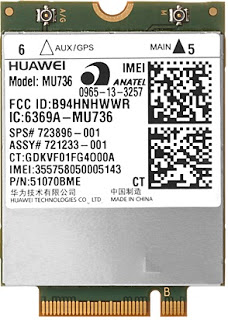
Sierra Wireless Driver Package for HP un2430 Mobile Broadband Module v1.0.45.0 REV: B
How to download and Install drives into windows.

Sierra Wireless Driver Package for HP un2430 Mobile Broadband Module v3.5.1308.3911 REV: B
How to download and install Drivers into windows.
Available link for download