Sunday, April 16, 2017
How to Customize Pen Drive as Ram Memory in Windows 7
How to Customize Pen Drive as Ram Memory in Windows 7
Programs that require lots of memory may not run smoothly , if your PC has a low memory. To avoid this make your pen drive/USB of large size as RAM, which will make your system faster. It can be possible with any kind of Windows operating system, all you need is a pen drive of minimum 1GB memory ,better to prefer 4GB.To know how to do this, follow below steps.

1.Format your Pen Drive first
2.. Insert the Pen Drive with 1GB at least in the USB port, Wait for the PC to detect the pen drive.
3. Right click on My Computer--> Properties.
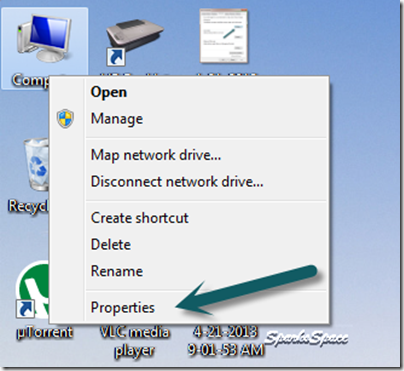
4. Select Advanced System Settings.

5. Select Advanced—> Performance –>Settings

6. Under Performance Options Select Advanced –>Virtual memory Change

7. Uncheck Automatically manage paging file size for all drives Click on Custom Size.Select your Pen Drive . Enter the same in the Initial and Max columns in the Custom Size .The size depends upon your free memory capacity of your pen drive. So you can change this limit according to your pen drive size.

8. Click on Set button, then click on OK.

9. Now restart your PC.Finally check the general start up time and also speed of your PC.This trick will surely improve the performance of your computer and increase operational speed in low cost.
Available link for download

Friday, December 2, 2016
How to Customize Firefox to Look Like Chrome Browser
How to Customize Firefox to Look Like Chrome Browser
Chrome Browser is the best thing that Google has created in order to have more smooth internet experience. Chrome was given a very minimalist look with small toolbar and no horror bulky toolbar feel like that old internet Explorer. They provided some awesome add-ons, extensions and themes to customize your browser’s look and make it work in the best way.
Available link for download
Tuesday, November 8, 2016
How to Customize Scrollbars in Blogger using CSS
How to Customize Scrollbars in Blogger using CSS
Scrollbars as you might see in every website is used to navigate and slide to other website content faster way, well you can click and drag the scrollbar and slide to the end of the website. But in all websites one thing is common that scrollbar is same and is boring. So now you can change the look of your scrollbar easily and make it dazzle with colors and anything you like using the awesome CSS language.
Available link for download