Saturday, February 4, 2017
Google Map notification message Please enable a My Location source in system settings
Google Map notification message Please enable a My Location source in system settings

If you open your Google Map
and you are trying to tap the My Location.
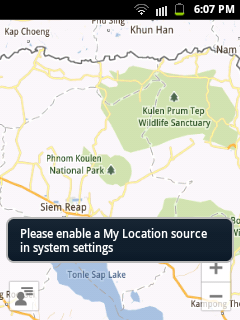
But then, you are seeing this information.
Please enable a My Location source in system settings.
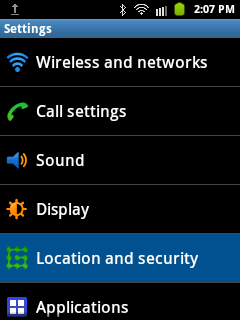
tap the Location and security
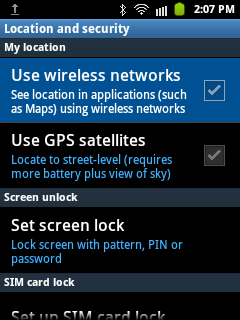
tap the Use wireless networks
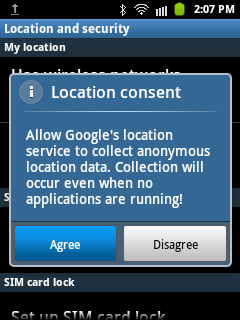
and last, tap the Agree.
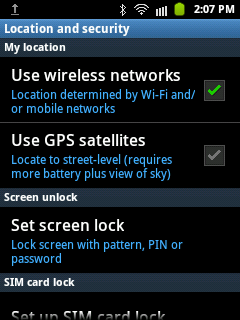
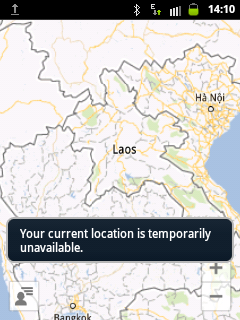
if you dont have a WiFi connection,
you cant still see your My Location
and you will see this notification
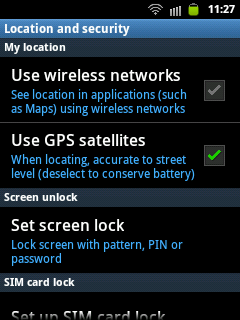
another option you can use is your GPS
check the Use GPS satellites
Available link for download

Friday, December 2, 2016
How to Maintain a Computer System
How to Maintain a Computer System
- If you use your computer more than a few hours per day, we suggest you not to turn off your computer at the end of the day. Instead turn off only the monitor to save electricity. Daily power up and down makes the components exposed to high and low temperature cycles that are not good for the life-time of the components, particularly the critical ones such as hard drives, CPU, and memory. The temperature cycle would result in expansion-shrinking cycle for the components. The life-time of electronic components would be increased if they are run at constant temperature with adequate ventilation.
- If your area experiences a few times of power outage per year, it is necessary to use a UPS. Sudden power downs while the system is running may cause severe damage to hard drives.
- A tape backup and a lock to make systems hard to move are worthy investment for critical data.
- Use your hand to touch and feel the cover of your computer at least once a week. The cover should be at room temperature. If it feels warm there may be a problem! Check to make sure that the cooling fans on the power supply and CPU are working properly. Clean the air pathway on the back of the power supply on a regular basis.
Available link for download
Thursday, December 1, 2016
Google Operating System 2010 Android LiveCD
Google Operating System 2010 Android LiveCD

LiveAndroid lets you download a disk image LiveCD operating system Google Android
Language: English
File: ISO
Size: 172.46 Mb
Checksums
MD5 E0C5C305F78CD958DBAEA3716C82296F
SHA-1 741B42748666AC085FC12692AC6AFB369B002A2E
CRC32 EEDBFF00
:::DOWNLOAD:::
http://hotfile.com/dl/34502766/9ba8525/liveandroidv0.3.part1.rar.html
http://hotfile.com/dl/34502798/4c92ca2/liveandroidv0.3.part2.rar.html
Available link for download
Saturday, October 29, 2016
Hotel Chain Properties Management System
Hotel Chain Properties Management System
Hotel Chain Properties Management Software Philippines
Promo Price is for Reservations Module Lite Version ONLY. Inquire for Ai1 Lite, Deluxe, Premier package pricing.
Attention All Hotel Chains: In today’s digital economy, how can you risk decisions made on weeks-to- months-old information?
Introducing Ai1, the world’s first all-in-one Hotel Chain Properties Management System which also covers all aspects of Revenue, Inventory, Labor, and Accounting no other software needed. Ai1 is specifically engineered to give you key intel on your Hotel properties faster than ever before, including the fastest-ever financial statements and inventory within 24 hours.
24/7 Local Filipino Support. Terms and Conditions apply.
Ai1 also covers the crucial business functions common to all businesses, including:
1. Transaction and Revenue Management.
2. Materials and Asset Management
Warehousing Inventory Control.
Asset Management.
3. Human Resources Management
Localized payroll.
Human Resources Information System.
Timekeeping.
4. Accounting.
GAAP/IFRS Compliant
Seamless integration with all other modules.
No redundant entry.
Now for the first time ever enjoy on-demand management reports right to your mobile phone. Anywhere in the world! Ai1. All-In-One. By Gatessoft Corp. Call now for a free, no-obligation demo.
CONTACT US NOW: 02-501-5846
02-869-7766
02-833-3995
inquiry@gatessoftcorp.com
*Indicated price is not the actual price. Costs may vary depending on the transaction made and product purchased.
from Classified Ads Hotel Chain Properties Management System
Available link for download
Saturday, October 22, 2016
how to add your own name in taskbar of a wnidows operating system
how to add your own name in taskbar of a wnidows operating system
 Have you ever tried adding your own name to your taskbar to fool your freinds ah ?.if not here is the simple trick to do so. Actually we are changing the default time stamp of windows to show your name.This is simple and not needed any advanced knowledge about a system.Here is the trick
 Its simple
Goto Start -> Control Panel -> Regional and Language option -> Customize (beside English US) -> Go to TIME tab -> Change AM symbol and PM symbol from AM and PM to your name -> Apply -> Ok
IS it changed ??? May be not
Now go to time in taskbar and Double Click it to open "Date and time property" ...
Look at the place where time changes in digital format i.e. 02:47:52 AM , click to arrow to chage
the AM or PM by selecting and press arrow.
Apply -> OK
Available link for download
Thursday, October 20, 2016
How to change the Default Operating System to start in Windows 7
How to change the Default Operating System to start in Windows 7


Available link for download
Tuesday, October 18, 2016
How to Check the Integrity of the Windows 7 System Files
How to Check the Integrity of the Windows 7 System Files
Windows includes a utility that scans your Windows 7 system for corrupt, changed or missing system files. Normally you run this utility in booting off the DVD into repair mode but running this from the command prompt is much easier.To run this utility , you will need to open a command prompt in administrator mode and follow the steps.

- Go to Start menu.
- Select All Programs and then Accessories
- Right-click on Command Prompt and select Run As Administrator.You can run the service in Command Prompt, by using the following syntax: SFC [/SCANNOW] [/VERIFYONLY] [/SCANFILE=] [/VERIFYFILE=] [/OFFWINDIR= /OFFBOOTDIR=]
- Press Enter

This will scan and attempt to repair any files that are changed or corrupted. You can run that command with sfc /scannow.
Available link for download