Thursday, April 13, 2017
How To Permanently Delete Remove Your Facebook Account Smr Trixx
How To Permanently Delete Remove Your Facebook Account Smr Trixx
How To Permanently Delete (Remove) Your Facebook Account Smr Trixx

Available link for download

Monday, January 23, 2017
How to delete Nimbuzz Account
How to delete Nimbuzz Account
I have seen many users asking, how to delete the Nimbuzz Account. Many maybe knowing it already. I would like to share the link using which you can delete your Nimbuzz Account. As per my view i will say better dont delete the account. If you are deleting it then others can create it.
Available link for download
Thursday, November 17, 2016
How to delete search history on google map on your phone
How to delete search history on google map on your phone
Google maps on your mobile phone remembers every search query or the text you input at the search box. For some reasons, you wanted to clear or delete your search history on google map app on your mobile phone. To clear/delete this data follow the instruction given below:
- Go to your Settings
- Choose Applications
- Select Manage applications
- Select the All tab
- Scroll down until youve found the Maps
- Then Clear data
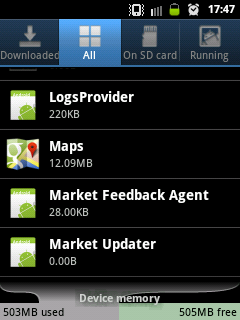
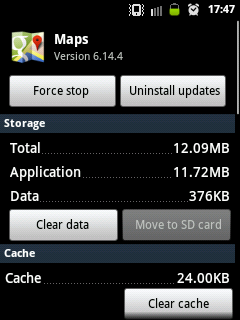
If you tap the Clear cache, the search history wont be deleted instead the map figures previously been cached or saved will be removed.
Available link for download
Thursday, October 20, 2016
How to Delete an Undeletable File or Folder in Windows
How to Delete an Undeletable File or Folder in Windows
Many times you face some issues in deleting some file or folder as it says the file is being used or any other error. Well at that time it gets a lot difficult situation for you, well there are many tools and 3rd party software's that you can use to remove an unwanted files or folders from your PC in a secure manner, but what if you want to go bare handed.
Available link for download
Tuesday, October 11, 2016
How to Delete Extra Home Screen on Android Phone
How to Delete Extra Home Screen on Android Phone
How to delete home screen page(s)
on Android Jelly Bean Version
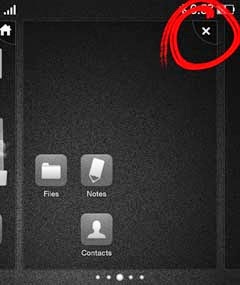
Go to your home screen
Tap and hold the screen until you feel it vibrates.
You will then see the screen looks like the image on the left.
Then tap/touch the X button at the upper right corner
How to delete home screen page(s)
on Android Gingerbread Version

On the home screen
tap/touch the MENU
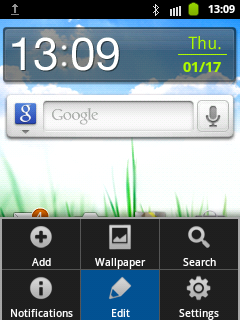
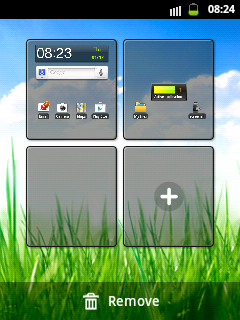
tap/touch Edit
tap/touch and hold the page that you want to delete until it vibrates.
For example I am going to remove the blank page.
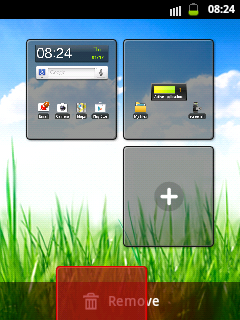
Hold that page down to the Remove area and you will see that this page turns red as it is approaching.
Available link for download