

Showing posts with label remove. Show all posts

Thursday, April 13, 2017

How To Permanently Delete Remove Your Facebook Account Smr Trixx

How To Permanently Delete Remove Your Facebook Account Smr Trixx


How To Permanently Delete (Remove) Your Facebook Account  Smr Trixx


Available link for download

Read more »

Saturday, January 28, 2017

How to Disable Remove Blue Seen Ticks In WhatsApp 2015 Smr Trixx

How to Disable Remove Blue Seen Ticks In WhatsApp 2015 Smr Trixx


How to Disable/Remove Blue Seen Ticks In WhatsApp - 2015 Smr Trixx

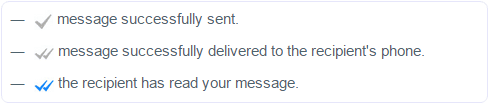
 WhatsApp is the worlds most popular messenger or cross platform messaging app for mobile phones which is used to send free SMS, Photos, Audios and Videos through internet. It is the highly downloadable app on mobile phones as compare to other apps.  As we all know through the last 2 years WhatsApp becomes the most famous messaging app for Android or other smartphones and also acquired by the giant social networking site Facebook. But if you have not Android or any smartphone then dont worry you can also Download WhatsApp on your PC or Laptop. Every time the developers add new features and update new versions. So recently WhatsApp developers add new feature called "Check Mark" or "Read Receipt" which will appear when you send every message to your recipient. Below is the function of "read receipt " feature.  

How To Disable Blue Ticks from WhatsApp

If you are really not satisfied with this feature then dont worry you can remove or disable this "Blue Ticks" or check marks. To remove this feature people not able to know that you read their message or not. May be some people know how to disable o remove these blue tick but those who dont know dont worry just follow below given steps to remove "read receipt". 

WhatsApp New SEEN Update: Read Receipt/ Blue Ticks Function
 
Step1:- Download Latest version of  WhatsApp. Mobile user can also download from Google Play Store
                                   
Download From Google Play Store
                                     
whatsapp from google play store

 Step2:- After Downloading new version >> Click on your WhatsApp account settings.

Step3:- Settings>> Then click on Account>> Privacy.

Step4:- Scroll down and you will find "Read Receipt" feature option. It will show you Tick on it Simply just Uncheck the tick option.

Another Method


Step1:- Download WhatsApp+ (Plus) from Gogle Play Store.


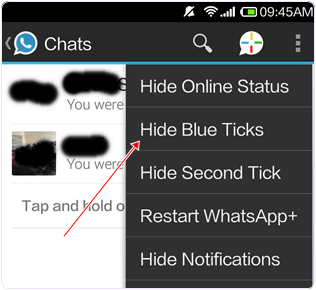
Step2:- After Installing WhatsApp Plus go to your WhatsApp menu and and click on Hide blue Ticks.  


remove/disable blue ticks in whatsapp

Note:- Those person who already have new version of WhatsApp they can simply follow the above steps and remove read receipt but those person who have not find Read Receipt option in privacy setting firstly download latest version of WhatsApp then follow the above steps.


Available link for download

Read more »

How do I force remove a package in Arch with pacman

How do I force remove a package in Arch with pacman


How do I force remove a package in Arch with pacman while other packages still depend upon it.
pacman -R perl-libwww 
checking dependencies...
error: failed to prepare transaction (could not satisfy dependencies)
:: perl-app-cpanminus: requires perl-libwww>=5.828
:: perl-app-pmuninstall: requires perl-libwww
:: perl-app-sd: requires perl-libwww
:: perl-catalyst-action-rest: requires perl-libwww>=2.033
:: perl-catalyst-runtime: requires perl-libwww>=1.64
:: perl-cpan: requires perl-libwww
:: perl-cpan-mini: requires perl-libwww
:: perl-cpan-uploader: requires perl-libwww
:: perl-feed-find: requires perl-libwww
:: perl-http-body: requires perl-libwww
:: perl-http-request-ascgi: requires perl-libwww
:: perl-module-cpants-analyse: requires perl-libwww
:: perl-module-install: requires perl-libwww>=5.812
:: perl-net-trac: requires perl-libwww
:: perl-net-whois-raw: requires perl-libwww
:: perl-prophet: requires perl-libwww
:: perl-rt-client-rest: requires perl-libwww
:: perl-uri-fetch: requires perl-libwww
:: perl-www-mechanize: requires perl-libwww
:: perl-xml-atom: requires perl-libwww
:: perl-xml-feed: requires perl-libwww

1 Answer


You should be able to reinstall the package with a simple:
# pacman -S perl-libwww
This will only remove perl-libwww:
# pacman -Rdd perl-libwww
Please notice the double -d in the command, if you use --nodeps you have to specify that twice too or combine it with a -d like:
# pacman -R --nodeps --nodeps perl-libwww
# pacman -Rd --nodeps perl-libwww
This removes all the packages which depend on perl-libwww:
# pacman -Rc perl-libwww
From pacmans man page:
 -d, --nodeps
Skips dependency version checks. Package names are still
checked. Normally, pacman will always check a package’s
dependency fields to ensure that all dependencies are
installed and there are no package conflicts in the
system. Specify this option twice to skip all dependency
checks.
-c, --cascade
Remove all target packages, as well as all packages that
depend on one or more target packages. This operation is
recursive, and must be used with care since it can remove
many potentially needed packages.


Available link for download

Read more »

Saturday, January 7, 2017

Home Remedies How to Remove Blackheads at Home

Home Remedies How to Remove Blackheads at Home


how to remove blackheads at home

Blackheads are another form of acne, they are black in nature due to the oxidized melanin which is a pigment made by skin cells called melanocytes. Now black heads on individuals face and nose are very much common in nature and its nothing to worry for as we have natural methods to remove black heads from face and nose, which we are going to see in this post.


Available link for download

Read more »

Saturday, October 1, 2016

How to Easily Remove or Hide Attribution Widget Blogger

How to Easily Remove or Hide Attribution Widget Blogger


Whenever you start out a new blog on free blogger platform you get many features and services for free + a small attribution link in the footer of every blog saying Powered by Blogger, well that good and I think it should not be removed as it gives credit to blogger for gaining more traffic to their website and engaging in creating more blogs. But still if you need to remove that attribution gadget than below is the easy CSS hack that you can use and remove it without deleting any coding. But then we have another technical option that removes this entirely from your blog enhance removing everything related to Attribution widget in blogger.


Available link for download

Read more »