Saturday, April 22, 2017
History of search engines
History of search engines

Site directories were one of the first methods used to facilitate access to information resources on the network. Links to these resources were grouped by topic. Yahoo was the first project of this kind opened in April 1994. As the number of sites in the Yahoo directory inexorably increased, the developers of Yahoo made the directory searchable. Of course, it was not a search engine in its true form because searching was limited to those resources who’s listings were put into the directory. It did not actively seek out resources and the concept of seo was yet to arrive.
Such link directories have been used extensively in the past, but nowadays they have lost much of their popularity. The reason is simple – even modern directories with lots of resources only provide information on a tiny fraction of the Internet. For example, the largest directory on the network is currently DMOZ (or Open Directory Project). It contains information on about five million resources. Compare this with the Google search engine database containing more than eight billion documents.
The WebCrawler project started in 1994 and was the first full-featured search engine. The Lycos and AltaVista search engines appeared in 1995 and for many years Alta Vista was the major player in this field.
In 1997 Sergey Brin and Larry Page created Google as a research project at Stanford University. Google is now the most popular search engine in the world.
Currently, there are three leading international search engines – Google, Yahoo and MSN Search. They each have their own databases and search algorithms. Many other search engines use results originating from these three major search engines and the same seo expertise can be applied to all of them. For example, the AOL search engine (search.aol.com) uses the Google database while AltaVista, Lycos and AllTheWeb all use the Yahoo database.
Available link for download

Saturday, December 31, 2016
HIstory of Motherboard
HIstory of Motherboard
Motherboard (printed circuit board or PCB) is a board full of metal from the circuit that connects electronic components with each other without cables.
Circuit board to get this name because it is produced in bulk with the printing.
history
* 1936 - printed circuit board was first found by Paul Eisler, Austrian scientists who enter the circuit board into a radio.
* 1943 - United States use circuit board with a large number of them in military radio.
* 1948 - commercialization printed circuit boards in the United States.
After 1950, printed circuit boards have been used massively in the electronic industry.
Classification
Printed circuit boards can be classified based on several types:
layer stack
Single layer
Double layer
Multi-layer (4, 6, 8 ply)
shape
Hard
Soft (flexible)
A combination of hard and soft
specification
Conventional
the high density (High Density Interconnect)
material base
FR4
Metal
Ceramics
http://www.kotagaul.com/forumdisplay.php?s=9b97a0a9f96fd452ba4ca1d79ccd3bd4&f=89
Specifications
Motherbord mainboard alias alias system board, refer to the third one the same, ie, a circuit board and panel-panel electronic menggerakan overall PC system. In principle, a motherboard is made up of some parts of the system CPU (processor), circuit clock / timing, Ram, Cache, ROM BIOS, I / O ports such as serial ports, parallel ports, expansion slots, IDE Prot.
That need to be!
Particularly, at least there are 7 things that must be on a motherboard. The seven components are:
* Chipset
* CPU Type
* Slot type and memory
* Cache memory
* System BIOS
* Slot expansion
* I / O Port
Indeed, heres a problem on the system or PC can be detected. Damage outside the 7 components are rare. The possibility that others, when the seven components to this wrong-wrong course, suspected that the problem should be located on the motherboard architecture itself, either circuit-sirkuitnya, or components dipergunakannya.
Chipset: commander of data and process
Chipset called this one because the goods are generally a pair of chip that control the processor and the features of the hardware mortherboard thoroughly. A pair of chips, which one called the North Bright chip and one called the South Bridge chip, can be spelled out is the commander-in-chief in a system called motherboard.Saat this, there are a lot of motherboards with chipsets different. Type chipset used on the motherboard will determine, among other things.
* Mobile processor can be used
* Type of memory that can support a PC system and its maximum capacity
* Kelengkapan I / O is able to provide
* Type of display adapter that can be used
* The width of the data that can be supported motgherboarad
* Availability of additional features (such as LAN, sound card, modem or onboard).
CPU Type
There are three types of CPU that many circulating in the market that Intel Corporation CPU output, output AMD Advanced Micro Devices, Cyrix and VIA C3 or output VIA Technologies Corporation. CPU alias output VIA processor itself, in general, the technology platform provided by Intel. That is, each series released VIA processor, in general, has always compatibility with the series of Intel processors made. Meanwhile, AMD uses a platform technology that is different from that used by Intel, although pross technology used by this company also follow what the Intel. Because the difference this platform, using the AMD processor socket or slot that is different from that used by Intel. When you mention Intel Slot 1, AMD call Slot A. on the processor socket, AMD later relative mengeluarakan more consistent in the type of connector is used, ie, always use a compatible connector on the speed of any series, that is, the connector pins with the number of 462 units. Compare with Intel, which is always change, of the 370 pin socket, and a 423 pin, then changed again to be 478. consequently, it is possible to upgrade to a new generation of Intel processors always be at the same time with the replacement of the motherboard itself. Here are a few historical development of the processor and the Intel clone its successful disarikan
Technology is the oldest to the newest
Starting with the debut Intel processor series MCS4 which is the embryo of the processors i4040. 4-bit processor is planned to be the brain calculator, in the same year (1971), Intel i440 to make revisions. Originally ordered by a Japanese company for the calculator, the processor is much more intense than expected, so Intels purchase rights to Japanese companies for the development and further research. Here for the development of the embryo of the processor to the computer.
Next 8-bit processor appear first i8008 (1972), but slightly less preferred because multivoltage .. new processor ago appear i8080, here there is a change in voltage that is a triple, a technology NMOS (PMOS not more), and introduce the first time the system clock generator (for additional chip), packed in the form of Array DIP 40 pins. And also appear processor2: -1974 Motorolas MC6800, Z80 from Zilog -1976 (the two rival weight), and another series prosessor2 artificial MOST 6500, Rockwell, Hyundai, WDC, NCR dst. Z80 full compatible with the i8008 only until the machine language level. Level rakitannya different language (not level compatible software). I8080 processor is the processors internal registers with the 8-bit external bus 8-bit memory addressing and 20-bit (can access 1 MB total memory), and operating mode REAL.
77 Thn appear 8085, generatornya onprocessor clock, cikal bakalnya the use of single voltage +5 V (implementation s 486DX2, DX4 start at +3.3 V ff).
i8086, register with the processor, 16-bit external data bus, 16-bit memory addressing and 20-bit. 78 yr Direlease using HMOS technology, components that support 16-bit bus is very rare, so the price becomes very expensive.
But demand for the market appears i8088 16bit internal bus, 8bit external bus. I8088, so the components can be used 8bit peripherals i8008. IBM chose to chip pebuatan IBM PC because it is cheaper than the i8086. If only the CEO of IBM says it is not just the PC side mere dream, of course, IBM will take the total PC market at this time. IBM PC first release in August 1981 has 3 versions of IBM PC, IBM PC-Jr and IBM PC-XT (extended technology). Chip i8088 is very popular, until the NEC has launched a chip that is built on the pin chip specification, which is named V20 and V30. NEC V20 and V30 processor that is compatible with Intel until the assembly level language (software).
Chip 8088 and 8086 fully compatible with the program that made the chip for 8080, although there may be some programs made for the 8086 chip does not work with 8088 (the difference between bus width)
Then, 80186 and i80188 appear .. since i80186, start processor packed in the form of a PLCC, LCC PGA and 68 feet .. i80186 physical shape with 17 foot squares persisi (PLCC / LCC) or 2 feet persisi array (PGA) and this is the start of the i80186 chip DMA and interrupt controller incorporated into the processor. ever since the 286, the computer uses the term IBM IBM PC-AT (Advanced Technology) and began to use the term PersonalSystem (PS / 1). And also started the use of 16 bit ISA slot which is developed from the 8-bit ISA slot, the crowd began to appear cloner. Its AMD, Harris & MOS that fully compatible with Intel. This began in 286, known use of Protected Virtual Address Mode that allows multitasking of the time sharing (via hardware resetting).
IBM 86 years to make RISC processor architecture with 32bit for the first-class PC. But as the scarcity of software, IBM RT PC is "sluggish" for enterprise-class, RISC is growing more rapidly, at least, there are many vendors that are not compatible each other.
Then, to reach the lost momentum of the i8086 chip, Intel i80286 create, register with the processor, 16-bit external bus, 16-bit protected mode, known as limited STANDARD mode using the memory 24-bit addressing that is able to access up to 16 MB of memory. 80286 chip is of course fully compatible with the chip-chip 808x series previously, with some additional new set of instructions. Unfortunately, this chip has a few bugs in the design of its hardware, so it failed to collect cohort.
In 1985, Intel launched a processor design that is new: i80386. A 32-bit processor, meaning that the register has a 32-bit external data bus 32-bit, and maintain compatibility with previous generation processor, with the introduction of additional mode PROTECTED 32-BIT memory for 32-bit addressing, is able to access a maximum of 4 GB, and do not forget to add some new instructions. This chip is packed in the form of PGA (pin Grid Array)
Intel processors up to this point has not been a unit of the FPU
internal. Support for the FPU, Intel launched a series of 80 × 87. Since 386 began appearing cloner processor: AMD, Cyrix, NGen, IT, IIT, IBM (Blue Lightning) dst, kind-macamnya: i80386 DX (full 32 bit)
* I80386 SX (cheap because 16bit external)
I80486 * DX (int 487)
* I80486 SX (487 disabled)
* Cx486 DLC (using MB 386DX, and others)
* Cx486 SLC (using MB 386SX)
* I80486DX2
* I80486DX2 ODP
* Cx486DLC2 (architecture 386 MB)
* Cx486SLC2 (architecture 386 MB)
* I80486DX4
* I80486DX4 ODP
* I80486SX2
* Pentium
* Pentium ODP
Around 1989 Intel launched i80486DX. Series which are very popular, the increase of this series is a series of 80,386-speed FPU and support schemes and internal clock multiplier (i486DX2 and iDX4 series), without additional new instructions. Due to public demand for cheaper processors, Intel launched the series i80486SX that no other processor is i80486DX the FPU to its circuits have been disabled. As it should, i80486DX series have full compatibility with instruction set chip-chip series before.
AMD and Cyrix processor design and purchase i80386 and i80486DX to make Intel-compatible processors, and they are very successful. In my opinion this is a process called cloning, as the story of NEC V20 and V30. AMD and Cyrix does not make vertical design process (based on a previous series chip), but based on chip designs that already exist to create a chip that classmates.
1993, and Intel launched its Pentium processor. Peningkatannya against i80486: PGA structure of a larger (higher speed, and pipelining, with new instructions. There is a special chip from this, only the fact that the standard VLB made to i80486 not match (not compatible) so that the chipset forced to re-designed to support PCI. Intel Pentium using the term to "blocked" saingannya. Since the Pentium cloner start this "fall" to stay AMD, Cyrix. Intel uses the term because the Intel Pentium lose patent in court. why the number can not be patented , so removing the Intel Pentium use TM. Cyrix, AMD does not want to fall behind, they issued a standard Pentium Rating (PR) in 92 previous intelligence had collaborated degan Sun, but failed, and Intel was charged by Sun because Sun allegedly copy the design. Since Pentium, Intel has implemented the ability Pipelining cuman usually have diprocessor RISC (RISC spt SunSparc). VESA Local Bus 32bit is the development of architecture 16bit ISA use the clock because it still has its own clock generator (usually> 33MHz) architecture, while PCI is a new architecture that speeds clocknya the processor clock speed (typically half the speed of processor speed) .. so the speed PCI VGA card will not be the same relative frequency in MHz processor in a different alias MHz processor more quickly, the sooner its PCI
In 1995, occurrence of the Pentium Pro. Innovation disatukannya cache memory to the processor socket dibuatnya claim 8. Pin-pin processor is divided 2 groups: group 1 for the cache memory, and 1 group for prosesornya own, no more than a pin-pin Pentium changed the order. This design allows the processor efficiency is higher when the handle 32-bit instructions, but if there is a 16-bit instructions appear in the cycle 32-bit instructions, the processor will make the evacuation process execution so that the cache is running low. But there are instructions added 1: CMOV (Conditional MOVE).
In 1996, Pentium MMX processor. In fact no more than a Pentium with additional units and additional set of instructions, the MMX. Intel until now still have not provided a clear definition of the term MMX. Multi Media extension is the term used AMD. There is a limitation on the design of this chip: MMX only because the module is added to the board in the draft without a Pentium stake back, Intel had to create a unit to MMX and FPU sharing, in terms of FPU at MMX active non-active, and vice versa. So MMX Pentium MMX mode in not compatible with the Pentium.
What about the AMD K5? AMD K5-PR75 is actually a clone i80486DX with 133MHz speed internal bus and 33MHz clock. Specifications are Pentium AMD K5 when designing the next versions Cyrix when designing and 6 × 86 is only limited to the specification of pin-pin Pentium. They were not given access to the original design. IBM does not even able to make Intel bergeming (Cyrix, have a contract tied up with IBM in 2005) on the draft AMD K6, K6 know that your design is actually the property of NexGen? While Intel says making unit MMX, AMD MMX explore the design and add it to the K6. Unfortunately MMX specifications are not likely that AMD used Intel, the K6 has proven many ketidakkompatibilitas with the Pentium MMX instructions MMX.
1997, Intel launched Pentium II, Pentium Pro with MMX technology, which has 2 innovation: the cache memory does not become 1 with the core processor such as Pentium Pro, but is outside the core, but works with processor speed. Innovation is what causes the loss of the lack Pentium Pro (the evacuation cache) Innovation second, the SEC (Single Edge Cartidge), Why? Since we can install the Pentium Pro processor slot in the SEC with the help of a special adapter. Additional: onprocessor because of L2 cache, the cache speed processor speed, while the PII cachenya in the "outside" (using the processor module), then half the speed of the processor speed. Also mentioned the use of the PII Slot 1 for several reasons:
First, widen channels of data (foot lot - also a reason for Socket 8), and processing on PPro PII can parallel. Therefore Slot 1 actually have more strength in Multithreading / Multiple Processor. (Unfortunately O / S has not been a lot of support, dual PII processorpun benchmark by more ZDBench conducted via Win95 instead via NT) Second, the possible upgrader Slot 1 without eating a lot of space on the motherboard because if not ZIF socket 9, the area can Form Factor (MB) its own concept sparingly this space since 8088 are also available. Why SIMM specification also out in 286? some of them is efficiency and simplification of the place.
Third, the cache module allows you to use a more efficient and balanced with the high-speed processor with a speed and again without a lot of places to eat, does not like AMD / Cyrix a "forced" double L1 cachenya to compete PII speed (due to its slow-L2) so that In conclusion AMD K6 and Cyrix 6 × 86 in the processor is not fast but quick hit in the cache! For the spec Socket7 speed L2 cache will be limited only as soon as the data bus / slow when the data bus is busy, the PII is planned to operate at 100MHz (66MHz not more). Point this is one of the reasons why Intels 430 chipset to 440 which means that must also change the motherboard.
http://asepmuhsin.wordpress.com/2007/08/19/mengenal-lebih-dekat-dengan-motherboard/
Available link for download
Thursday, November 17, 2016
How to delete search history on google map on your phone
How to delete search history on google map on your phone
Google maps on your mobile phone remembers every search query or the text you input at the search box. For some reasons, you wanted to clear or delete your search history on google map app on your mobile phone. To clear/delete this data follow the instruction given below:
- Go to your Settings
- Choose Applications
- Select Manage applications
- Select the All tab
- Scroll down until youve found the Maps
- Then Clear data
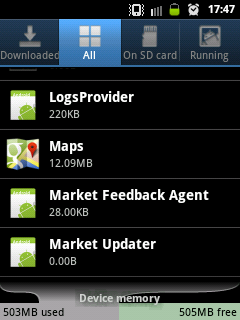
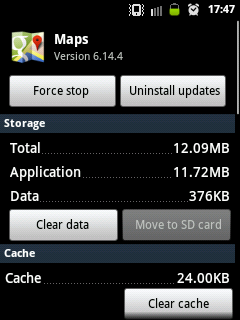
If you tap the Clear cache, the search history wont be deleted instead the map figures previously been cached or saved will be removed.
Available link for download
How To Clear Safari History On Your iPad
How To Clear Safari History On Your iPad
There are many times when you don’t want others to see your browsing history. Well, in that case, clearing the browser history is very much necessary especially if you are not a single user of your iPad device.

Learn-How To Clear Safari History
- First of all, open up your iPad device.
- Then, go to the Settings menu, you can simply access it from your iPad’s home screen.
- Now, in the Settings menu, scroll down a bit and then tap on the Safari option.
- Then, in the Safari option, you can simply remove your Safari web browsing history by tapping on the Clear History And Websites Data option. And then, it will ask you a confirmation about clearing your entire browsing history and then just confirm it if you want to clear your entire browsing history.
- Additionally, if you also want to clear your Safari web browser cookies and other data then just tap on the Clear Cookies And Data option, it will be under the Clear History And Websites Data option.
- Then, it will also ask you a confirmation, then just go ahead and tap on Clear button.
- That’s it! You are done! Now, you have successfully cleared your Safari browsing history and as well as cookies of your Safari web browser.
Conclusion
Available link for download
Saturday, October 8, 2016
History Sweeper 3 01
History Sweeper 3 01

Content Temporary Files; History Files; Cookies; Auto Complete Password; Auto Complete Form Data (including your search terms); AOL; and MSN; Google Toolbar, MSN Toolbar, and Yahoo Toolbar histories.
Document History; Windows Find History; Windows Run History; Temporary Files; Recycle Bin; Network History; and Last Logon User.
Microsoft office (Word, Power Point, Excel, and Access); Windows Media Player; RealPlayer (including RealOne Player); and Adobe Acrobat Reader.
http://rapidshare.com/files/140642895/HS301.rar
cyberserg.com
Available link for download