Showing posts with label smr. Show all posts
Showing posts with label smr. Show all posts
Thursday, April 20, 2017
How To Download Paid Android Apps For Free 2015 Smr Trixx
How To Download Paid Android Apps For Free 2015 Smr Trixx
How To Download Paid Android Apps For Free - 2015 Smr Trixx
 Android Market is best platform for mobile applications including many different categories on interest bases. Almost all categories included both free or paid apps. Few of them are free to download but remaining are paid apps. But the main question is why few apps paid ? This is because most of big and complex apps having too many features. Which are not easy work for developers to create so they charge some money to earn and invest in their work. This is only depend on the developers to publish android apps as paid or as a free.
But as we all know the Aptitude of human nature, We always dreams of that thing which are difficult to achieve. So dont worry we will try to turn your dreams into reality. So here is the solution of your problem about how you can download paid android apps free. There are many different methods which may or may not work but i will discuss only two methods which i find best instead of others. Before proceeding with this tricks i recommend you to take look on my another amazing article about How To Run Android Apps On PC.
Steps To Run Paid Android Apps For Free
1st Method
In this method you have to download an apps name Blackmart Alpha which helps you to download any android app from Google Play store which is paid. Mostly all paid apps are successfully work sometime you may got error.
- First of Download BlackMart Alpha From Here
- Now Install it on your Android Phone.
- Now Open Black mart and in the search box enter the name of that app.
- Now Download that particular app through BlackMart on your Android Device.
- Now your Paid Apps is working successfully.
-

2nd MethodIn this method you have to download apps from some famous websites which are in the form of .apk extension and then you have to transfer them from PC to mobile.
- Firstly you have to visit 4shared.com or mediafire.com on your PC or your can also install their apps on your mobile phone.
- Now open these sites and you have to search the exact name of particular apps which you want to download in the format of Appsname.apk. Dont forget to enter the extension name .apk at the end.
- Now download the apps from that site on your PC or laptop and transfer them on mobile phone.
- Now install them on your phone and enjoy your new paid apps.
In the end of this trick i only say sometime some apps may or may not work so please try it will any another apps because their is no chance any failure of this trick. I hope you find this trick amazing and working.
If you face any kind of doubt feel free to share your comment.
Available link for download

Thursday, April 13, 2017
How To Permanently Delete Remove Your Facebook Account Smr Trixx
How To Permanently Delete Remove Your Facebook Account Smr Trixx
How To Permanently Delete (Remove) Your Facebook Account Smr Trixx

Available link for download
Wednesday, April 12, 2017
How to Make your Facebook Profile Picture non clickable Smr Trixx
How to Make your Facebook Profile Picture non clickable Smr Trixx
How to Make your Facebook Profile Picture non-clickable Smr Trixx
Do you want your profile picture to be non-clickable? Are you concerned about your privacy? Then answer of your query remains in this article and I am discussing it in details.

You might have seen many users whose profile pictures are non-clickable means you cannot view them in full screen mode. Actually they have disabled click on their profile picture which is helping them to maintain their photos’ security. So, if you also want to make your Facebook profile picture non-clickable then today I am focusing on this point.
Ones you have followed this tutorial then your profile picture will be completely secure and nobody will be able to steal or copy your profile pictures for any reasons.
- Embed Facebook Posts on your Blog
How to Make your Facebook Profile Picture non-clickable
So, here are the steps which you are supposed to follow to secure your profile picture and make it non-clickable. Now without taking your time I would request you to get towards the below steps;
- First of all, Sign in to your Facebook account.
- Now head towards Profile and Click on Photos.
- After that, Click on Albums and then Click on Profile Pictures.
- Then Open your current profile picture or which you are going to set.
- After that, click on little globe along with image publishing date and then change the settings to Only Me. Refer the below screenshot for more clarity.
- Now you are done, your will be now non-clickable. Apply the same settings to each image to make any of your personal image non-clickable.

Conclusion
This was about securing your Facebook profile, I am sure this guide would have been proven helpful for you guys. If you have any queries left related to this article then lend your queries in the comment box. I shall get back to you as soon as possible.Available link for download
Wednesday, February 22, 2017
How To Hide Whatsapp Images Videos From Gallery Smr Trixx
How To Hide Whatsapp Images Videos From Gallery Smr Trixx
How To Hide Whatsapp Images & Videos From Gallery Smr Trixx

Smartphones are widely used today because of amazing features and affordable cost. Smartphones are used because of fast internet, high quality camera, video calling, full touch support, high speed processor and RAM, large storage etc. With the increased of Android and iPhone users. It becomes easy to chat with friends via social networking sites and messengers apps like Facebook, whatsapp, line and many more. All these messenger apps are available for free on Google playstore but some of them may be paid dont worry must check how to download paid android apps free.
WhatsApp messenger now become popular and addicted app ever just because of their latest features like video calling, Chatting, File sharing, privacy options etc. WhatsApp messenger also reduce our cost of phone calling to our relatives and friends. Whatsapp does not introduce software product for PC yet. Which does not required phone requirement. But i already share a method for How To Install Whatsapp In PC. With the help of Whatsapp we can share our images with others and receive these images. But these images are shown with our regular images in Gallery. So these images confuse with our important images in gallery. If your are also frustrate from this images then this article is really for you because in this article we are going to discuss about how to restrict these images from appearing in the phone Gallery.
Methods To Remove WhatsApp Images From Gallery
Steps For Android Phone Users
Step 1. Launch the file manager App of your mobile. You can also install different file manager App on Your Android devices like ES file Explorer, total commander File manager App etc.
Step 2. Find your WhatsApp media folder using the file manager. Commonly it is found on Home >> SD card >> Whatsapp >> Media.

Step 3. Inside the Media folder you will see a sub folder named WhatsApp images.

Step 4. Rename this folder to .WhatsApp images.

OR
Alternative Way
Step 4. Alternatively you can also create a .nomedia file inside this folder. You can create new file by clicking on the Plus button and select the file option.

Step 5. After Step 4 you can open your Gallery and see your Whatsapp folder become invisible. If it is still visible then you have to clear cache for Apps in your Android device. You can clear cache by Go to setting >> App Manger or Apps >> clear cache. Don.t forget to turn off hidden files option.

Note:- Android OS is based on the Linux kernel if we Add . or period in front of folder or file name it will become completely invisible.
Steps For An iPhone Users
If you are iPhone user then it is so simple for you to restrict the Whatsapp images Appearing in the Gallery within few clicks.
- Just go to you phone settings-> Privacy->Photos->Untick WhatsApp.
- After following the above step you will not see your WhatsApp images in Gallery.

So these are different method to hide whatsapp image gallery on android and iPhone easily. If you know any of the best way for this must share it with us. We will update it soon.
Available link for download
Saturday, January 28, 2017
How to Disable Remove Blue Seen Ticks In WhatsApp 2015 Smr Trixx
How to Disable Remove Blue Seen Ticks In WhatsApp 2015 Smr Trixx
How to Disable/Remove Blue Seen Ticks In WhatsApp - 2015 Smr Trixx

WhatsApp is the worlds most popular messenger or cross platform messaging app for mobile phones which is used to send free SMS, Photos, Audios and Videos through internet. It is the highly downloadable app on mobile phones as compare to other apps. As we all know through the last 2 years WhatsApp becomes the most famous messaging app for Android or other smartphones and also acquired by the giant social networking site Facebook. But if you have not Android or any smartphone then dont worry you can also Download WhatsApp on your PC or Laptop. Every time the developers add new features and update new versions. So recently WhatsApp developers add new feature called "Check Mark" or "Read Receipt" which will appear when you send every message to your recipient. Below is the function of "read receipt " feature.
How To Disable Blue Ticks from WhatsApp
If you are really not satisfied with this feature then dont worry you can remove or disable this "Blue Ticks" or check marks. To remove this feature people not able to know that you read their message or not. May be some people know how to disable o remove these blue tick but those who dont know dont worry just follow below given steps to remove "read receipt".
WhatsApp New SEEN Update: Read Receipt/ Blue Ticks Function
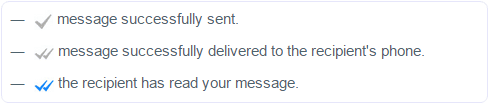
Step1:- Download Latest version of WhatsApp. Mobile user can also download from Google Play Store
Download From Google Play Store

Step3:- Settings>> Then click on Account>> Privacy.
Step4:- Scroll down and you will find "Read Receipt" feature option. It will show you Tick on it Simply just Uncheck the tick option.
Another Method
Step1:- Download WhatsApp+ (Plus) from Gogle Play Store.
Step2:- After Installing WhatsApp Plus go to your WhatsApp menu and and click on Hide blue Ticks.
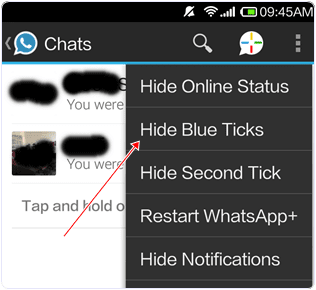
Note:- Those person who already have new version of WhatsApp they can simply follow the above steps and remove read receipt but those person who have not find Read Receipt option in privacy setting firstly download latest version of WhatsApp then follow the above steps.
Available link for download
Sunday, October 23, 2016
How to Check Computer 3d card Smr trixx
How to Check Computer 3d card Smr trixx
How to Check Computer 3d card Smr trixx

Available link for download
Monday, October 3, 2016
How To Make WhatsApp Free For Lifetime 2015 Smr Trixx
How To Make WhatsApp Free For Lifetime 2015 Smr Trixx
How To Make WhatsApp Free For Lifetime - 2015 Smr Trixx
 As every knows Whatsapp is Fastest Growing Messenger for Mobile Phones. Whatsapp is highly downloadable mobile application. Every person who use internet on mobile always use Whatsapp, instead of doing sms from number to everyone because sms needs to activate costly packs which offers limited messages but Whatsapp allow to send unlimited messages with better interface and inbuilt number of amazing features like sharing images, videos, audios or other files as you want.
But the Major Problem with Whatsapp is that, its free subscription is just for one year. Means due to program policies of Whatsapp you can use it free for 1 year for every new installation. Then after completing 1st year you have to pay $0.99 to activate Whatsapp for next year. So here i will try to introduce amazing trick about making Whatsapp free after completing 1 year.
Note:- I know $0.99 is little bit amount and everyone can easily afford. So if your are not interested to do this then i just suggest you read it for fun because our aim is to increase your knowledge only.
So here i am going to start simple and easy steps about how you can extend your Whatsapp service time period. Before following below steps i also recommend you to read my previous post about how you can use Whatsapp on your PC or Laptop.
Download Whatsapp Free For PC or Laptop
Steps To Make Whatsapp For Lifetime.
- If you have any android or other mobile where you already install Whatsapp then i suggest you to delete you account and Whatsapp both from your device.
- Now you need iOS device i recommend you to use iPhone for this. If you already then follow steps. Otherwise Borrow it from you friend or any other person.
- Make sure that they dont have already installed Whatsapp. If they dont having Whatsapp already then you need to download it from iTunes search like Whatsapp for free because iTunes Offers sometime free apps.
- Now Install Whatsapp in iOS. After the installation, Activate your mobile number and verify it.
- After the verification, now use your Activated number on your own device and Check your Service time it is extended to Lifetime.
I hope this trick is working for everyone.Sometimes If you are lucky then you got lifetime service. But sometimes Whatsapp service period only extend for 1 year or may be for 10 years. But we does not guaranty about it sometime it may not work depend upon you luck and right time. Then i request you to pay little bit amount of $0.99 via PayPal or any other available method.
If you face problem while implement this trick successfully then feel free to share your response in below comment box.
Available link for download
Subscribe to:
Posts (Atom)