Showing posts with label videos. Show all posts

Tuesday, April 11, 2017

How to Embed YouTube Videos with Optimized Loading

How to Embed YouTube Videos with Optimized Loading


Embedding YouTube videos in any webpage is great, it enhances your content and helps your reader to view your content in a much broader way. Either you are a blogger or just a website creator embedding YouTube videos in your blog is a must step for engaging good readership, as they need a nice way to learn new things.


Available link for download

Read more »

Friday, February 24, 2017

How To Download Facebook Videos Without Using Any Software

How To Download Facebook Videos Without Using Any Software


Download Facebook Videos

Everyone know that Facebook is a one of the best social network and media share network. Where people daily share their pics , videos , status and much more. People also see videos and pics on home page. Most of the people save its favorite pics but if we like any video then we have trouble to download it. Most of the people couldn download facebook videos. For download facebook videos people use many software and tricks. Here is the best trick to download facebook videos without any software you just need to some simple steps and you do it. So follow me below simple and easy steps.


Step By Step Method To Download Facebook Videos
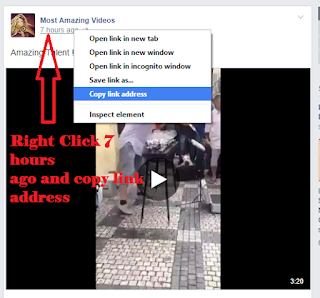
Step 1 : Open your desired video which you want to download then right click on date and click on copy link address as shown in below image.


Step 2 : After copying URL open URL in new tab for example below the URL of video 
https://www.facebook.com/permalink.phpfbid=258291907879398

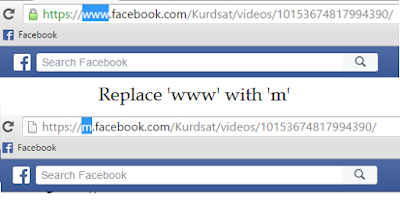
Step 3 : Now replace www with m like this https://m.facebook.com/permalink.phpfbid=258291907879398  

Step 4 : Now open video in Mobile format it will look like this 


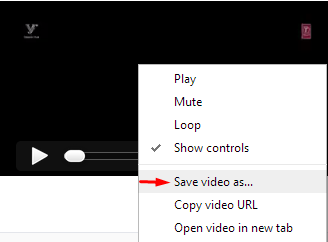
Step 5 : Now right click on video and click on save video as for download video like below in image

Note : First play video then right click on video and click on save video as choose your location where you want save video now your video is began to download. If you like this How To Download Facebook Videos Without Using Any Software Plz share with your friends. 


Available link for download

Read more »

Wednesday, February 22, 2017

How To Hide Whatsapp Images Videos From Gallery Smr Trixx

How To Hide Whatsapp Images Videos From Gallery Smr Trixx


How To Hide Whatsapp Images & Videos From Gallery  Smr Trixx


How To Hide Whatsapp Images & Video From Gallery
Smartphones are widely used today because of amazing features and affordable cost. Smartphones are used because of fast internet, high quality camera, video calling, full touch support, high speed processor and RAM, large storage etc. With the increased of Android and iPhone users. It becomes easy to chat with friends via social networking sites and messengers apps like Facebook, whatsapp, line and many more. All these messenger apps are available for free on Google playstore but some of them may be paid dont worry must check how to download paid android apps free. 
WhatsApp messenger now become popular and addicted app ever just because of their latest features like video calling, Chatting, File sharing, privacy options etc. WhatsApp messenger also reduce our cost of phone calling to our relatives and friends. Whatsapp does not introduce software product for PC yet. Which does not required phone requirement. But i already share a method for How To Install Whatsapp In PC. With the help of Whatsapp we can share our images with others and receive these images. But these images are shown with our regular images in Gallery. So these images confuse with our important images in gallery. If your are also frustrate from this images then this article is really for you because in this article we are going to discuss about how to restrict these images from appearing in the phone Gallery.

Methods To Remove WhatsApp Images From Gallery

Steps For Android Phone Users

Step 1. Launch the file manager App of your mobile. You can also install different file manager App on Your Android devices like ES file Explorer, total commander File manager App etc.
Step 2. Find your WhatsApp media folder using the file manager. Commonly it is found on Home >> SD card >> Whatsapp >> Media.
Whatsapp mobile media database
Step 3. Inside the Media folder you will see a sub folder named WhatsApp images.
Step 4. Rename this folder to .WhatsApp images.
rename whatsapp mobile folder

OR 
Alternative Way
Step 4. Alternatively you can also create a .nomedia file inside this folder. You can create new file by clicking on the Plus button and select the file option.
rename whatsapp mobile folder to .nomedia
Step 5. After Step 4 you can open your Gallery and see your Whatsapp folder become invisible. If it is still visible then you have to clear cache for Apps in your Android device. You can clear cache by Go to setting >> App Manger or Apps >> clear cache. Don.t forget to turn off hidden files option.
clear cache for gallery whatsapp
Note:- Android OS is based on the Linux kernel if we Add . or period in front of folder or file name it will become completely invisible. 

Steps For An iPhone Users

If you are iPhone user then it is so simple for you to restrict the Whatsapp images Appearing in the Gallery within few clicks. 
  • Just go to you phone settings-> Privacy->Photos->Untick WhatsApp.
  • After following the above step you will not see your WhatsApp images in Gallery.
whatsapp iphone photo media privacy settings
So these are different method to hide whatsapp image gallery on android and iPhone easily. If you know any of the best way for this must share it with us. We will update it soon.


Available link for download

Read more »

Thursday, November 10, 2016

How To Download Youtube Videos using Terminal

How To Download Youtube Videos using Terminal


First download youtube-dl
sudo apt-get install youtube-dl

Then go to Youtube and grab the address of the video that you want.
Once copied, type this in terminal to start downloading:
youtube-dl (paste the address here)

Example:

youtube-dl https://www.youtube.com/watch?v=V2y92H2kiIM

After its finished downloading, check your Home folder, it should be there.
The file name is usually the same as the address i.e. V2y92H2kiIM.mp4 as shown in the following pictures.


Easy peasy :)

For more info on youtube-dl go check out their website:
http://youtube-dl.org/


Available link for download

Read more »

Monday, October 17, 2016

How to download youtube videos using the ss trick

How to download youtube videos using the ss trick


This trick is so cool which I just figured out and it works perfectly for downloading any YouTube videos which you like and would want to save on your PC for later use when offline.

So, here is how you can download youtube videos using this "ss" trick.

a). Visit Youtube right now and just play any YouTube videos which you find useful.
b). Play the video and while its still playing just go and type ss i.e. "ss" in the url of the video after leaving http://www.
c). Now press enter and this thing would take yo straight out of YouTube to another website where you will get a bunch of options to play with.
d). I recommend everyone to help of this video http://www.youtube.com/watch?v=Gt2SmMprL48
e). Choose your video file type and format of the video and press the download button and the video will get downloaded on your pc for free.

Advantages of using this "SS" trick for downloading videos:

1.  Its free to use.
2. No such risk of loosing money there.
3. Can download any youtube video.
4. This ss trick not just work perfectly on youtube but also on other video sharing websites.
5. Downloading video by just typing "ss" in the video url is kind of cool to me.

Disadvantages of using this "SS" trick for downloading videos:

1. Only one and that is that it can only download limited size video files which are less than 200MB in total size.
Check this url if you are sunny leone fan here Sunny Leone


Available link for download

Read more »