Sunday, April 23, 2017
How to Fix Error 27 on Canon Pixma MP145
How to Fix Error 27 on Canon Pixma MP145

What is Canon Waste Ink Absorber Full
Waste ink absorber ????? ?????????????
Waste ink absorber ????? ???????? cartridge ????????? ????????? ???????????????????????? ?????????? printhead ??? ???????????????????? ???????????? ???????????? ?????????????????? ?????????? ???????? ??????????????? (Selang) ?????????? ????????????????? ????????????????????????????? ??????????????? ????????????? ink tank ????? ??????????? ?????????
Canon printer ?? chip counter ??? ??????????????? ??? ?????? print ?????????????????? ?????? ?????? ?????????????? ???????? ????????????????? Chip ?? Print ??????????????????????? ??????? ?????????????????? ???????????????????? ??????????????????????? ???? Printer ??? absorber ??? chip ??????????????????????????? ???????????????? printer ?? ???????????? ?????????? ???? ?????????? printer ??? ?????????????????? "Waste ink absorber is full" ?????? message ??? print ?????????? ?????????????????? ????????? ?????????? ??????????????? ?????????????????????? ??????? ??????? ???????? ????????????????? ???? printer ??? LED ?????????? (?)?????? ???????????? (?)????? error alarm ????????????????
?????????? ?????????????????????????????? Canon ??? ??????????????????????? ???????? ????????? ???? ???????????????????????????? ????????????????????? Canon Printer ??? ???????????????????? ????????????? ???????????? ???????????? ????? ???????????? ?????????????????????????? ????? ??????? ???????????? ??????? ???????????? printer ??? electronic ?????????????????? waste ink ?????? ???????????????????? ???? printer ??? ????????????? ?????????????????? ???????????? Ink absorber full ?????????????? Canon IP PIXMA printer ??????? chip counter ?? error ??????? ???????? ????????????
Solution
Canon Printer ??? manual ??????????????????? ??????? ?????????? ??????????????????????? ??? ????????????????? ???????? ????????? ????????????????????? ?????????????????? ???????????????? "Please contact service support" ???? :)
Error Codes for MP145/150/160 Series
E3-3 = Paper jam
E4 = No ink
E5-5 = The ink cartridges are not installed or a non-supported ink cartridge is installed, or the ink cartridges are not installed properly
E8 = Waste ink absorber full, or platen waste ink absorber full
E9 = The connected digital camera / video camera does not support Camera Direct Printing
E14 = The Ink cartridges whose destination are wrong
E15 = Ink cartridge is not installed E16 – Ink remaining is unknown
E16 -E19 = Failed to scan head alignment sheet
E22 = Carriage error
E23 = Paper feed error
E24 = Purge unit error
E25 = ASF(cam) sensor error
E26 = Internal temperature rise error
E27 = Waste ink absorber full or platen waste ink absorber full
E28 = Ink cartridge temperature rise error -
E29 = EEPROM error
E33 = Paper feed position error
E35 15 = USB Host VBUD overcurrent error – USB
E37 17 = Abnormal motor driver error
E40 20 = Other hardware error
E42 22 = Scanner error
The number of the Reset :
button pressing
LED Function Remarks
0 time Green Power off
1 time Orange Service pattern print
2 times Green EEPROM print
3 times Orange EEPROM reset
4 times Green Waste ink counter reset
I am getting error code E27 on Canon MP145
Error Code ??????? ????????????? ???????? E27 ????????????????????????? Waste ink absorber ?????????? ??????????? ????????? ???????? ?????????????????????? ???????????????? ???????????????? ????????? ???????????????? ???????????????? ????????? ???????????????????????? ???????????????????? ?????????????? ???????????????? ????????????????? ????????????????
(?) ???? printer ??? power ?????????? ???????? Stop/Rest button ??? ?????????? Power ??? ????????? ???????? (Power button ????????? ?????? ??????????????)?
(?) ??????? Printer ?? Power button ??? ???????? Power ??????????????? Stop/Reset button ??? (2) ???????????????? ???????? Stop/Rest button ??? ?????????? ???????????????? Power button (On/Off) ????? ???????? ??????????????????
(?) ???????? Stop/Reset ??? (?)????????????????? ??????????? Stop/Reset button ?????????????? ???????????????? ???????????? alarm ????? ??????????? alarm ??????? ?????????? LED ?? ??????????????? ????
(?) Stop/Rest button ??? (?) ????????????????????? Printer Power Cable ???????? ????????????????
(?) ???????? Power Cable ???????????????? Power button (On/Off) ??? ????????????? ????????????
(?) ????? ???????????????? ???????????????????????? ????? ????? ???????? ??????????? ?????????????????????????? ????????? ?????? procedures ??????? ???????????????? ??????????? ????????????????????? ????????? ??????????????
Available link for download

Sunday, April 9, 2017
How do I fix the flash is not detected
How do I fix the flash is not detected
The following is just a way for computers with the Windows OS
1. Insert the stick into the USB port of the computer. If detected appears in the usual hard drive or in My Computer after a while.
2. If it appears try to right click on the USB drive icon and then left click on format. Choose FAT32 for operating systems beyond Windows 98. Click start and then format.
or by way of:
1. Download an application called HDD Low Level Format Tool
http://www.techspot.com/downloads/5265-low-level-format-tool.html
2. Then install as usual
3. Open the application we will look at the screen all the disk drives detected
4. Select the flash to be repaired and then click "continue". Ensure that you have the correct drive not to any
5. Then select LOW-LEVEL-FORM and click Format this device
6. Well, now the flash is ready for use, before we have to format it first
May be useful
Available link for download
Sunday, April 2, 2017
How to fix Unfortunately the process com google process gapps has stopped on Samsung S2 S3 S4 mobile Iphone
How to fix Unfortunately the process com google process gapps has stopped on Samsung S2 S3 S4 mobile Iphone
Basically for this error you have to clear the cache and some other info.
Goto Settings. Choose Applications. Tap on the All Tab at the top. Locate and tap on the Play Store app. Tap on the Clear Data button. Tap on the OK button to confirm. Tap Clear Cache too
Available link for download
Wednesday, March 29, 2017
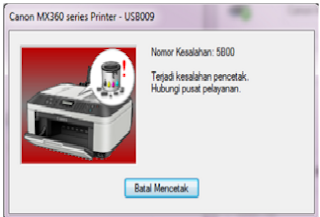
How do I fix Error 5B00 on Canon iP2770
How do I fix Error 5B00 on Canon iP2770
Previously you should have a resetter Canon iP2770.
If you do not have a try Download Resetter Canon iP2770 v1074 are widely spread on the internet
First into Service Mode iP2770:
1. The printer is turned off and the power cord.
2. Press the RESUME button two seconds
then press the POWER button until the green light flash (when pressing the POWER button, ... RESUME button jgn removed first)
3. Then release the Resume button, but do not release the button POWER.
4. While the POWER button is still depressed, press the Resume button 5 times. Led will flash alternately orange last green with orange flames. (not to be mistaken 4x because the printer will die in total, but it is temporary too) Then ...
5. Release both buttons simultaneously.
6. Led will blink for a while then it will flash GREEN.
7. The computer will detect the new device, ignore it .....
8. This situation shows iP2770 printer in a state of SERVICE MODE and ready to reset.
Then run Resetter iP2770 v1074 it:
1. File Exctract Resetter iP2770.
2. Prepare 2 paper in the printer (to print at the time of the reset process).
3. Run the program Resetter iP2770
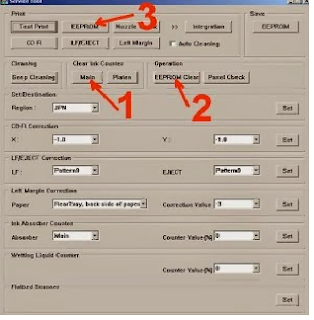
4. Click "PLAY", then the printer will proceed, then the iP2770 will print a page with the words "D = 000.0"
5. Click "EEPROM Clear".
6. Then click "EEPROM", and the printer will print the results Resetter iP2770. One line in his writings as follows:
"TPage (TTL = 00000)"
7. Turn off the printer by pressing the POWER button.
8. Done ...
May be useful
Available link for download
Tuesday, March 28, 2017
How to Fix Error 5B00 Printer Canon iP2770
How to Fix Error 5B00 Printer Canon iP2770
Available link for download
Sunday, March 26, 2017
How to FIX Broken Links on any Webpage for Free
How to FIX Broken Links on any Webpage for Free
Broken links are bad for your site, in Google's term it’s like a poison being delivered to readers in form of pure water. Well yes I know the example is pretty absurd but you can understand by implementing yourself instead of your readers, what if you visit a website and you face some broken links for the stuff you desperately needed, well the same happens to your readers, so its very important to remove all the broken links and replace them with the working one’s.
Available link for download
Monday, February 27, 2017
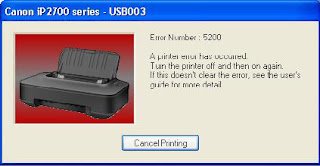
How to fix error 5200 of Canon IP2770
How to fix error 5200 of Canon IP2770
Available link for download
Wednesday, January 11, 2017
How to fix it yourself home button is broken
How to fix it yourself home button is broken
I suggest to take it to an Apple Authorized Service to be repaired.
If you are at all the Home button does not work, try turning Assistive Touch to still get the Home button functionality on the iOS screen. Many iOS users turn on the feature to minimize damage to the Home button.
Go to Settings> General> Accessibility> AssistiveTouch and turn on the feature.
Once turned on, you will see a transparent button on the screen that can mimic the functions of the Home and other gesture.
Available link for download
Thursday, December 29, 2016
Guide How to Unbrick and Fix your Bricked Infuse 4G by GTG
Guide How to Unbrick and Fix your Bricked Infuse 4G by GTG
Heres a solution that may help you fix your bricked Galaxy Infuse 4G. According to the developer of this ROM, this package will restore your device firmware to a completely stock state. This is useful to those who messed up and flashed their Infuse 4G with a wrong PIT ans screw up their PIT partitions in some other way.
Instructions:
1) Make sure the drivers for the Infuse 4G are
Available link for download
Monday, December 26, 2016
How to fix NTLDR is Missing
How to fix NTLDR is Missing

NTLDR ????????? NT Loader ??? ???????????????????????? ???? Hard Disk ? Sector ???? ?????? Program ???????????????????? ??????? Windows NT ??? ??????????????????????? Windows NT Startup Menu ??? ??????????????? ?????????????? ??????????? NTLDR ?????? Program file ????? ?????????????????????????? Hard disk ??? Boot Sector ??? ??????????????????????? ??????????????? Windows ???????????????????????????? Windows XP ??????? Windows NT ??????? ?????????? ???????????????????? NTLDR ??? ??????????????? NTLDR ????????????? Windows XP ??????? ??????????? ???????????? ??????????? ????????????????? NTLDR ??????????? Boot ????????????????-
NTLDR is missing????? ???????????????????????? Windows ????????????? ??????????? ????????????????-
Press any key to Restart
(?) Boot ???????????????? ?????? Computer ??? ????? Boot ??????????????????
(?) Hard Disk ??? BIOS setup ?????? ???????? ????????????????
(?) NTLDR ????????? (?????????) ???????????? NTDETECT.COM ??????? ???????????????
(?) Boot.ini ??????? File ??? ????????????? Configuration ???????????????
(?) FAT 32 ??? ??????????????? Win 95, 98 ????? ME ?????? Windows XP ???? Upgrade ???????????????
(?) Hard Disk ?????????????? ?????? ??????????????
(?) Hard Disk ????????? Boot Sector (?????????) Master Boot Record ??????????????
(?) Windows 2000 (?????????) Windows XP ????????????? ???????????????
(?) IDE (????) EIDE hard disk ? Data Cable ???????????????????????? ????? ??????????????????????? ??? ??????? ????????? ????????????? ??????????
Windows XP Installer CD ????? ??????????????

(?) ?????????? Windows XP CD ??? ???????????? Drive ???????????? CD ??? Boot ???????????
(?) Welcome to Setup ?????? Screen ???????? Keyboard ?? Repair ???????????? R ??? ?????????????
(?) ??????????????????? Windows ??????????????? 1 ????????????????? Enter ???????????????? (C Partition ??? 1 ?? ???????????????????? ????????)
(?) Administrator Password ?????? ???????????????????? ??????? Enter ??????????????????
(?) Command Prompt ?? ??? NTLDR ????? NTDETECT.COM ?????? ????? (?)???????? CD Drive ?? Hard Disk ?????? Copy ?????????????? ???????? ???????????? Command ?????????-
C: ????????? Hard Disk ??? ???????????????? D: ????????? CD Drive ??? ??????????????????????? ????? ??????? ??????????? ???????????? Drive Letter ??? ????????????????? Keyboard ?? Map ???? ????????????? Enter ????????????? CD Drive ??? Windows Partition ??????? Drive Letter ??????? ????????
COPY D:I386NTLDR C:
COPY D:I386NTDETECT.COM C:
Command ???????????????????????? Keyboard ?? Enter ????????????? 1 File(s) Copied ???? ????? File Install ?????? ??????????????????? (?)?????????? Copy ???????????????? Windows CD ??????? Drive ??? ???????????? Computer ??? Researt ??????????????
???????????? (?)
NTLDR Boot Disk ????? ??????????????
(?) NTLDR Fixing Bootable CD ????????????????????? fixntldriso.zip ???????????????? Download ?????????????
(?) ????????? ????????? Zip ???????? Win RAR ????? Extract Files ?????????? ????????? zip file ???????? ????? (?)????????????? Nero ????? CD-ROM(ISO) Format ????? ??????????????
(?) ????????? Bootable CD ?????? CD Drive ??????????? ????????? Computer ??? ????????????? Keyboard ?? Delete Key (or) Bios ?????????????????????????? ????????????????? Key ?????????? ????????????? ????????? Boot Device ???? 1st Boot Order ??? CD Drive ??? ???????????
(?) ????????? Save and Exit ?????????? ?????? Press any key to boot from CD...??????????? Keyboard ?? key ?????????? ???????????????? ?????????????? ????????????? ???????????????
1ST TRY THIS seleccione esto primero
2ND TRY THIS essayez ceci en deuzieme
3RD TRY THIS wahlen Sie diesen Third
4TH TRY THIS selezioni questo fourth
5TH TRY THIS selecione este fifth
6TH TRY THIS seleccione este sexto
7TH TRY THIS essayez ceci en septieme
8TH TRY THIS wahlen Sie dieses achte
9TH TRY THIS selezioni questo nono
10TH TRY THIS selecione este decimo
(?) 1ST TRY THIS seleccione esto primero ????? ???????????? Enter ??? ????????????? ?????? Windows ????????????????? ???????????????
For more Details: http://tinyempire.com
Available link for download
Sunday, December 25, 2016
How to fix HDD Bad Sector with HDD Low Level Format
How to fix HDD Bad Sector with HDD Low Level Format
Here are the steps for using HDD Low Level Format Tool:
1. Download HDD Low Level Format http://hddguru.com/software/HDD-LLF-Low-Level-Format-Tool/.
2. Install and run the program HDD Low Level Format tools to finish
3. Using HDD Low Level Format Tool
4. Select the hard drive you want to format, and then click Continue ..
5. Click LOW-LEVEL FORMAT tab, click FORMAT THIS DEVICE
6. Wait for it to finish, and usually the process will take a while, depending on the hard drive is used, can be 30 minutes, 1 hour, even hours.
Note:
In addition to the hard drive (SATA, IDE or SCSI), HDD Low Level Format Tool could be to reformat flash, Flash Card, and the like.
may be useful
Available link for download
Sunday, November 6, 2016
How to fix the Canon Printer Cartridges
How to fix the Canon Printer Cartridges
Steps to fix it, namely:
1. If the printer has not been used, and then want to repair, it would be nice printer cartridges soaked in warm water (to facilitate ink frozen). Warm water should soak the bottom and the side of the cartridge.
2. Soak for - / + 20 minutes, then drain until dry (can wipe gently with a soft cloth).
3. Please fill cartridges with a special type of printer ink canon printer (if empty ink).
4. Cartridges pair back to your Canon printer.
5. please turn on your printer, be sure the driver is installed first.
Available link for download
Tuesday, November 1, 2016
How To Fix Cue Club Mouse Problem
How To Fix Cue Club Mouse Problem
The game Cue Club is having the mouse problem for a lot of time and now this problem is fix and the steps to fix it are written below
Step 1
Right Click on the Cue Club Icon and click on properties, and a box will appear

Step 2
Click on the compatibility tab on the box

Step 3
Check the Run this program ……. box and press OK

Now You are done Thanks for reading
Available link for download
Saturday, October 1, 2016
How to fix Canon ink cartridge Colour cl 41 not detected
How to fix Canon ink cartridge Colour cl 41 not detected
Canon ink cartridge not detected - Canon ink cartridge not detected: Long Rifle develop it a more large selection. There are two cross-shaped drives on the PCB. Canon ink cartridge not ...
inkcartridgesfacts.5webs.net/canon-ink-cartridge-not-detected.html
How to override Canon ink cartridge not recognized - How to fix the ink cannot be detected after i refill? - Canon ink cartridge not detected. Why are my ink cartridges not recognized canon? ...
www.extremecow.com/How_to_override_Canon_ink_cartridge_not_ recognized-qna7139.html
Printer Cartridge Missing or Not Detected - 15 Nov 2010 ... How should a missing or not detected error message be interpreted? ... Epson, Canon, etc) cartridge that is two to three times cheaper ...
ezinearticles.com/?Printer-Cartridge-Missing-or-Not-Detected.
Available link for download