Sunday, April 9, 2017
Google Pack software free tools and utilities
Google Pack software free tools and utilities
What is Google Software Pack?
Google software pack is a free collection of software from one of the worlds biggest IT companies. The collection includes useful software for everyone including web developers. In fact, a few of the software is essential for web developers.
The Google software Pack offers utilities for image management, virus scanning, spyware and adware detection and removal, internet browsing, searching, voice, video and IM communication and much more.

Google Pack includes essential software for web developers
According to me the five essential software for web developers included in the Google software pack are the Chrome and Firefox web browsers, Google Toolbar for Internet Explorer, Google Desktop and Skype. And why do I think these are so important... read on.
Google free web browser Chrome was not a part of this software collection till it came out of the beta version. however, its now the first program in the list and carries a check mark by default. This is one browser you HAVE to check out, especially, if you are a web developer - experienced or a newbie. Chrome offers an uncluttered work space with no distracting icons and uncessary buttons. In fact, the one text field at the top allows you to enter both URL and search query (searches performed using the Google search engine) - really neat!
The usage of the Firefox browser has been steadily increasing - statistics from this web site show that more than 40% visitors surf the web with Firefox. No web developer or web designer worth his/her salt can be without this browser. It is imperative that when you design a web site you not only check it in Internet Explorer but also Firefox web browser. The tons of free Firefox Addons make it a must have software.The Google Toolbar, which comes with Firefox, but has to be installed for Internet Explorer is an indispensable tool. In addition to a pop-up blocker, AutoFill (saves you time, as you no longer need to fill up online forms each time), SpellCheck (helps you correct typos and spelling errors), the Google Toolbar has some really nifty things for web developers. The one I like the most is the Enhanced Search Box in which you can type your query directly and search the Google database. The new feature of this search box is that it offers "useful suggestions based on popular Google searches". Now these suggested queries may help you fine tune your keywords (this is not to challenge the fabulous Google Adwords Keywords Tool). The other two favorite elements of the Google Toolbar that I really like are PageRank Display (all web developers know this or should know about the Google PageRank) and Bookmarks with which you can "create and label bookmarks that you can access from any computer".
The Google Desktop is one great piece of software. The main reason I first installed it was to have a better search tool on my computer - to replace the Search feature provided with Windows. But man... this is way-way more than a simple search tool. It has these little elements called the Google Gadgets like the Scratch Pad and To Do list that I now cannot live without.
Skype is a communications software tool and if you dont have it (or worse, dont know about it), you are missing out on a lot of time+money savings as well as fun. I use Skype (and Google Talk, which is another software that comes with the Google Pack) regularly to keep in touch with my customers (who are in 7 different countries). No more emailing and waiting for a reply and then emailing again. With Skype I can make calls to my customers telephone line for pittance. By the way, Skype to Skype calls are 100% free. So if you have your friends/relatives residing abroad you can ask them to install this software on their systems and then you would be able to talk endlessly... and its free!
Source : http://www.webdevelopersnotes.com
Available link for download

Tuesday, March 21, 2017
How to download free software
How to download free software
 1. Go to torrentpond.com
2. Type any software you want to download. 3) OKey. Search till You get.
 4) Choose any file with, crack or keygen
 5) This is important. Seed Peers and health to show that that file is okey to download.
 6) Before you can download. Make sure you download any of this two software
Utorrent or bittorent software.
7) Download via torrent.
 8) The download process is depend on you internet speed.
What is torrent?
Torrent client enables a user to search for and download torrent files using a built-in search box ("Search for torrents") in the main window, which opens the torrent search engine page with the search results in the users default web browser.
The current client enables a range of features, including multiple parallel downloads.
Torrent has several statistical, tabular and graphical views that allow a person to see what events are happening in the background. A host of views offer information on the number of peers and seeds which are present, from how much data is being downloaded to how much data is being uploaded.
It has an automatic recovery system which checks all data that has been handled after an improper shutdown, such as a power failure. It also intermediates peering between itself, source file servers ("trackers") and other clients, thereby yielding great distribution efficiencies. The client also enables users to create and share torrent files.
Since version 6.0, the BitTorrent client is a rebranded version of µTorrent. As a result, it is no longer open source, and this version of the program is currently only available for Windows.Available link for download
Sunday, March 5, 2017
HOW RESET INK LEVEL CANON MP198 MANUAL SOFTWARE RESETTER
HOW RESET INK LEVEL CANON MP198 MANUAL SOFTWARE RESETTER
How to manual reset ink level Canon MP198 ? and where i cant get Canon MP198 software resetter ?
Restore the level of ink in a Canon MP198 multi-function, is required when a warning message appears on the screen. Many printers communicate with a computer using software provided by the manufacturer. This allows the printer to tell the computer when the ink level of one or more ink cartridges are low. To reset the ink level of the printer you must first verify the current level of the ink and then run a manual reset.
Instructions
Check the ink level
1 Click the "Start" menu and select the "Devices and Printers."
2 Click on the icon of the Canon MP198 printer and select Properties from the shortcut menu.
3 Go to the "maintenance" and select "View the printer status."
4 Click the "ink Details" to see the confirmation screen ink.
Manual Reset
1 Press the Power button on the keyboard to the printer on the printer.
2 Press and hold the "Stop / Reset" button until the display shows "1." This indicates that the level of ink in the printer has been reset.
3 Repeat this process each time an ink warning message appears on the screen.
Whereas software resetter for Canon MP198 you can using MPtool Software.
Tag: manual reset ink level Canon MP198, Canon MP198 software resetter
Available link for download
Friday, February 24, 2017
How To Download Facebook Videos Without Using Any Software
How To Download Facebook Videos Without Using Any Software
Download Facebook Videos

Step By Step Method To Download Facebook Videos
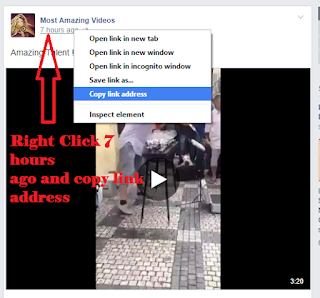
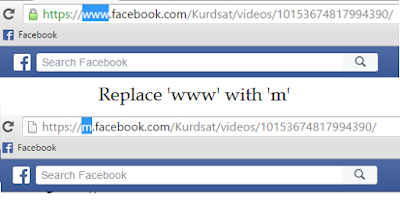

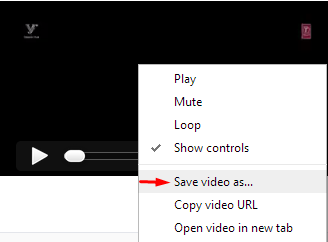
Available link for download
Tuesday, December 27, 2016
How to Find Serial Key Of Any Software Using Simple Google Trick
How to Find Serial Key Of Any Software Using Simple Google Trick
Overview Finding Serial Key
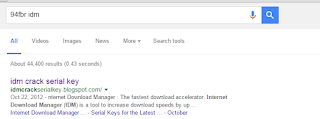
Today,I m talking about new trick .which solve your problems . Its Software tricks .Now you can download software with serial key .Most of you download and use pirated software from torrents or any such other sites, but sometime it gets very difficult to find serial key of those software. I will make it easy for you by showing you simple yet very interesting google trick which will allow you to find serial key of any software very easily.How To Find Serial Key Of Any Software ?
Available link for download
Monday, December 12, 2016
How to get free Profesional Software
How to get free Profesional Software

Well if you want to use the shareware without having to buy it you can download from the site GiveAwayOfTheDay.com. Every day there is only one software that you can download for free. Shareware who are provided free at the previous date you can not download again.
Therefore, in order that your information not only what free software you can download, you can subscribe to the feed via email or other feed reader.
Translated from www.klik-kanan.com
Available link for download
Tuesday, November 1, 2016
How I Made 1 000 000 Reselling Software Download Now
How I Made 1 000 000 Reselling Software Download Now
Ugly 1-page websites earned me $1,242,708.62 last year by reselling software.
I broke my system down into a formula that allows me to put these campaigns together quickly, and get them out and earning money fast.
The information in this guide is the result of years of trial and error as well as a million dollars’ worth of spilt tests to find the best combination of things that work.
Read More
Download Links (1 MB) This content is for members only.
Download Here
Available link for download