Tuesday, February 21, 2017
House for sale in Liloan cebu near Sm Consolacion
House for sale in Liloan cebu near Sm Consolacion
Eastland Estate Subdivision in Lilo-an Cebu
Healthy and Comfortable Lifestyle…
Eastland Village is a confirmation that one can actually live with nature, without having to leave away from the city. The residents of this Residential Subdivision will be treated to lush tropical landscaping and spectacular amenities for families and individual recreation within the vicinity.Eastland Village is a reflection of fine taste and modern comforts. Privacy and peace of mind assures pleasurable living for its residents.
It offers residential luxury
where business, shopping, academic, health and religious establishments nearby thrive. Comfort and convenience is assured. Luxury is provided with a grand main entrance to the Subdivision complete with security, a lagoon type of swimming pool complimented with a lush tropical landscaped childrens playground, water slides, and a gazebo. A recreation hall club – house, a basketball and a tennis court as well as a jogging path will surely add up to a
healthy and comfortable lifestyle.
AMENITIES:
- Main Grand Entrance with Guardhouse
- Complete Security Check at Entrance & Inside the Village
- Concrete Roads
- Concrete Curbs & Gutters
- Street Lightings
- MCWD Water System
- Underground Drainage system
- Lagoon Type of Swimming Pool
- Lush Tropical Landscaped garden beside the Pool
- Gazebos
- Reception Area for private parties
- Childrens Parks & playground
- Recreational Hall – Clubhouse
PAYMENT TERMS:
- Reservation Fee: Php 30,000.00
- IN-HOUSE / PAG-IBIG / BANK FINANCING SCHEME:
20% Equity Payabale up to 12 months without interest - 80% BALANCE:
In-House Straight financing rate of 1.2% per month to to 5 years term.
Bank or Pag-ibig financing has its own financing term - Basketball Court
- Ready Cable Provision
- PLDT Telephone Lines
- Perimeter Fence
JORGIANE MODEL
- Lot area: 315 sq.m
- Floor Area: 166 sqm
- Price : Php 8,750,000.00
- 2-Storey
- Single detached,
- 4 Bedrooms,
- Living, dining & kitchen,
- 3 toilets and baths with
- 1 Bathtub & shower enclosure in the master’s bedroom,
- 2-Car garage,
- Entry porch and lanai,
- Balcony from the master’s bedroom
FOR APPOINTMENT CONTACT :
ALMIRANTE HERBIETO
Real Estate License #: 0005812
Email: crs25realty@gmail.com
Mobile: +63920-9640292
Mobile: +63925-5640292
Website: http://www.crs25realty.com
Website: http://www.ceburealtyshop.com
from Classified Ads House for sale in Liloan cebu near Sm Consolacion
Available link for download

Monday, February 20, 2017
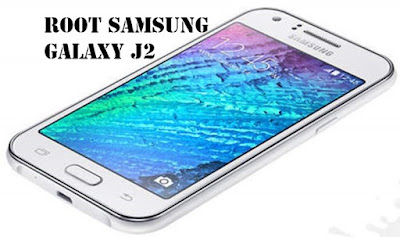
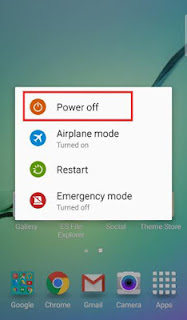
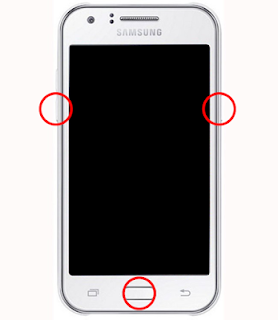
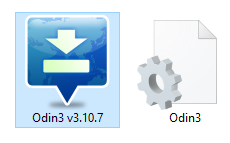
How To Install TWRP Samsung Galaxy J2 SM J200
How To Install TWRP Samsung Galaxy J2 SM J200
How To Install TWRP Samsung Galaxy J2 SM-J200

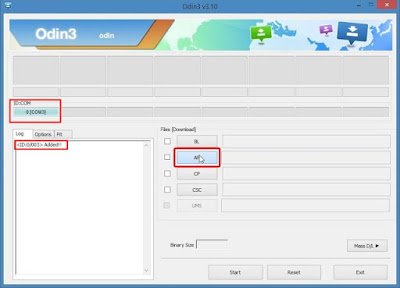
Available link for download
Saturday, February 4, 2017
House and lot near SM Seaside city
House and lot near SM Seaside city
Sharing a lively location with a number of resorts and hotels, and just a stone’s throw away from the soon-to-rise South Road Properties, South Covina Seaside Homes offers you the convenience of modern city living with the unique comfort and relaxation of having a seaside home overlooking the deep blue waters of Cebu’s sultry coast.
CARIDAD (2-STOREY SIDE ATTACHED)
Lot area: 63 sqm to 72 sqm
Floor area: 91 sqm to 93 sqm
Selling Price: Php 2,837,000.00 to Php 2,925,000.00
3 Bedrooms
2 Toilet & Bath
1 Powder Room
1 car garage
FEATURES AND AMENITIES:
Rainwater tank per unit
24-hour CCTV & security
Multipurpose Hall
PAYMENT OPTION
Reservation Fee: Php 30,000.00
Option 1 : Spot Cash with 5% discount
Option 2:
Spot Down payment with 2%discount
20% Down payment spread over 12 month, 18 months, 24 months or 36 months
80% Balance thru Bank
FOR APPOINTMENT CONTACT :
ALMIRANTE HERBIETO
Real Estate License #: 0005812
Email: crs25realty@gmail.com
Mobile: +63920-9640292
Mobile: +63925-5640292
Website: http://www.crs25realty.com
Website: http://www.ceburealtyshop.com
from Classified Ads House and lot near SM Seaside city
Available link for download
Sunday, October 16, 2016
How To Flash Stock Firmware On Samsung GALAXY J5 SM J5008 Using Odin V3 10 6
How To Flash Stock Firmware On Samsung GALAXY J5 SM J5008 Using Odin V3 10 6
How To Flash Stock Firmware On Samsung GALAXY J5 SM-J5008 Using Odin V3.10.6.

Flash Stock Firmware On Samsung GALAXY J5 SM-J5008. See you on android guide at guidebelajar, now, I will share a simple guide how to flash a stock ROM on Samsung GALAXY J5 SM-J5008 using Odin V3.10.6 software. Samsung GALAXY J5 SM-J5008 is the smartphone with 5 Inchi wide LCD, work on Android OS, v5.1 (Lollipop), with Qualcomm Snapdragon 615 Exynos 7580 Chipset, supported with Quad-core 1.4 GHz Cortex-A53 & quad-core 1.0 GHz Cortex-A53 CPU and Adreno 405 GPU, combined with 1,5 GB of RAM and 13 MP of Main camera and 5 MP on secondary camera.
Flashing process in android Smartphone is like reinstall process on windows computer PC, with flash your Samsung GALAXY J5 SM-J5008 android device you can unbrick, downgrade, manually upgrade (instead of updating via OTA or Samsung Smart Switch), or restore Samsungs stock firmware instead of custom ROM. I make this guide just for you as user all Samsung GALAXY J5 SM-J5008 variant.
You need to read this guide carefully, so you can get the best result flashing on your Samsung GALAXY J5 SM-J5008. Cause you need to download necessary file, you must ensure that you have good internet connection in your computer device, this guide using a windows computer.
Initial Step To Flash Samsung GALAXY J5 SM-J5008
Now, we have reached on beginning guide, so you must to do initial step to ensure everything run smoothly.
1. Make sure your Samsung GALAXY J5 SM-J5008 battery is not in a low battery state, a minimum of 80%. If the battery runs out in the middle of the Root, it can lead to failure
2. Always perform backup your important data before flashing process, Cause this process will delete or erase the data in memory.
3. Make sure you have installed a Latest of Driver Samsung that support with your Smartphone, If you dont have, please download here
4. Original USB cable driver for your Samsung GALAXY J5 SM-J5008
5. Download Samsung Smart Switch, Here
6. Download Odin V3.10.6, Here
7. Download Official firmware file for the model number of your device, download it from - SamMobile, or you can visit the other site, Here
Firmware Detail.
Before you perform flash to your Samsung GALAXY J5 SM-J5008, make sure your downloaded firmware is like this :
Model: SM-J5008
Model name:
Country: China (China Mobile)
Version: Android 5.1
Changelist: 610694
Build date: Thu, 11 Jun 2015 08:52:33 +0000
Product code: CHM
PDA: J5008ZMU1AOF1
CSC: J5008CHM1AOF1
Main Guide To Flash Samsung GALAXY J5 SM-J5008


- You must download all necessary file.(Samsung USB driver or Smart Switch and Odin)
- Then you must install all driver or samsung smart switch to your computer or PC.
- Extraxt Odin V3.10.6. file on the destination folder.
- To download Samsung firmware you must visit this link, you can download specific firmware file for your device model number. you must Log In with your registered account on this website.

sammobile website Log In - On the row menu at the top of page, you can select firmware.
- Then you must enter in search bar with your phone model number. you can type SM-J7008 as your phone models then press enter.

download firmware Samsung GALAXY J5 SM-J5008 - And you will see search result like this. you can click your phone models link

- Then select your country.

download firmware Samsung GALAXY J5 SM-J5008 - Then you click on appear link.
- Select regular download.

download firmware Samsung GALAXY J5 SM-J5008 - And Donwload button again. Approximately file size is 884 MB
- Wait untill your file finish downloaded, after that you must extract all firmware file on specific folder on your computer.
- This is your file.

Flash Stock Firmware On Samsung GALAXY J5 SM-J5008 - Switch Off your Samsung GALAXY J5 SM-J5008 to start flashing process.
- Then, you must run Odin3 v3.10.6 by right click on Odin.exe and select Run as Administrator.

Flash Stock Firmware On Samsung GALAXY J5 SM-J5008 - When program is running, now you can click AP, and navigate to the *.tar or *.tar.md5 firmware file.Now your firmware file has been inserted in Odin3

Flash Stock Firmware On Samsung GALAXY J5 SM-J5008 - Then, Enter download mode your Samsung GALAXY J5 SM-J5008 by pressing and hold Volume Down Button + Home Button + Power Button. Hold and press all button untill your phone vibrate and LCD show menu.

- And you will see picture like this on your LCD screen.
- On this mode, now you must connect your Samsung GALAXY J5 SM-J5008 to your PC / laptop using a USB cable.
- After your phone connected, you will see a message appear that show your device added and there is info on the ID: COM at top left corner. Keep in mind for this COM vary depending on the PC / Laptop. Just Ignore all, in this picture you will see that your device is detected on (COM 5)

- Make sure re-partition is NOT ticked
- When everything already you can click Start Button. at the bottom left corner
- Just wait for the process to run about 2-5 minutes, and make sure there is no interference in this process.
- When complete it will display a notification PASS and your smartphoneSamsung GALAXY J5 SM-J5008 will automatically restart.
- Wait your device to boot up, it will take a while.
- When your Samsung GALAXY J5 SM-J5008 is ready to use, you can check your firmware update version by dial *#1234# on dial pad.

dial pad samsung GALAXY J5 SM-J5008 - And you will see your new firmware version.

firmware version s Available link for download
Read more »
Subscribe to: Posts (Atom)