Wednesday, March 29, 2017
Handy Task Manager s60 v3 dan Touchscreen
Handy Task Manager s60 v3 dan Touchscreen

Fitur Handy Taskman :
- menemukan dan mencari aplikasi yang diinginkan dengan mengetik huruf pertama dari namanya.
- buat cara pintas dalam daftar Favorites untuk mengoperasikan aplikasi, panggilan atau mengirim SMS dengan hanya satu klik.
- dapatkan informasi lengkap tentang aplikasi yang sedang running, serta memori bebas yang tersisa pada ponsel (RAM, memori telepon dan kartu memori).
- menu Close, Kill untuk menutup semua program yang sedang beroperasi dengan satu klik.
Handy Taskman pada artikel ini terdapat nomor registrasi untuk dapat mengakses full aplikasi ini.


Available link for download

Saturday, March 11, 2017
How to install Fluxbox Window Manager in Ubuntu
How to install Fluxbox Window Manager in Ubuntu
Fluxbox is a super fast window manager written in C++ that is being used as the GUI "creator" by many desktop environments. And just like with OpenBox (another WM) which is used in LXDE, Fluxbox is also extremely resource friendly thus its especially being used in those "small GNU/Linux distributions" (you know small in size and resources, etc) nowadays more than ever as well.
Although the last time I tried it (bit of a long time ago actually), well it was really stable and fast but it did feel somewhat "sluggish" when it comes to minimizing or maximizing windows (with few delays just as with Openbox).
But if you want to give a try at this resource friendly window manager in Ubuntu, then the installation is pretty simple actually since its in the official repositories. You can install Fluxbox in Ubuntu 11.04, 11.10, 10.10 and 10.04 by using the below command.
sudo apt-get install fluxboxBut as a Ubuntu 11.04 Natty Narwhal user, if you want to use the latest builds of Fluxbox window manager, then you can certainly make some use out of the dedicated PPA channel (thanks to Paul).
But remember, it includes the "Nightly Builds", so the packages may not be the most stable ones out there thus should only be used for testing purposes or if you want to get the latest updates of Fluxbox (and other related packages) but okay with the fact that it might drift you towards a bit of an unstable system (yikes).
To add it to Natty and install the latest builds you can use the below commands. As usual, open your terminal and enter the below commands.
sudo add-apt-repository ppa:fluxbox-maintainers/nightlyThen log-out and on the GDM log-in screen, just choose "fluxbox" under session. That should do the trick. But remember, this fluxbox WM only supports Gnome and KDE desktops + it will not support Unity or Gnome Shell interfaces since theyre build using entirely different, a bit advanced compositing WM such as Compiz and Mutter.
sudo apt-get update
sudo apt-get install fluxbox
But dont hope to get the same level of features with fluxbox as with Gnome or KDE for instance because at the end youll be disappointed!.
And while using the "Fluxbox" desktop session, if you launch apps such as Nautilus file manager, then youd run into trouble because Nautilus will try to replace the desktop management instead of fluxbox!.
But as a quick solution, we can disable Nautilus for dealing with your desktop. To do that, open the terminal window and enter the below command.
gconf-editor
Then from the window that you get, go to: "apps" -> "nautilus" -> "preferences".
Now to your right-side scroll down until you see a setting called "show desktop" (as with below screenshot). Remove the check mark and it should solve your problem.
 |
| This will also disable desktop icons, etc in Gnome classic and Unity too. So, unless youre gonna be using Fluxbox as your primary somewhat desktop... then this could be a headache :)... |
Available link for download
Saturday, February 11, 2017
How to Install Xarchiver archive manager in Ubuntu Linux
How to Install Xarchiver archive manager in Ubuntu Linux
By default Ubuntu uses the File-Roller as the main archive manager (an original Gnome application). Its quite good actually but being a Gnome app, for the good or the worse it integrates the Gnomes simplicity (yikes) thus it wont let you change some options such as the default temporary folder location and creating a self extracting archive for instance.
Anyhow, if youre a bit frustrated with it and looking for something else that has the capacity to act as a powerful and fast loading archive management utility, then you should try the one called Xarchiver.
Xarchiver is basically a GUI front-end that uses a lot of built in command-line tools which are built into the GNU/Linux operating system to handle archives + is already the default archive management tool used by LXDE and Xfce desktops too.
It has a pretty simple (bit similar to the File-roller actually) interface and lets you do things like...

*. Add/Rename/Delete or Create an archive (containing emails, text files, etc) from scratch.
*. Save an archive into a different format.
*. Add or remove passwords.
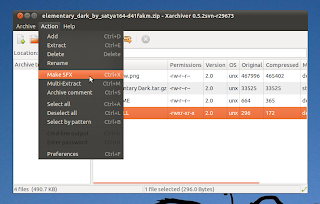
*. Test for extraction errors.
*. Supports a huge list of file formats such as - 7z, ARJ, bzip2, gzip, LHA, lzma, lzop, RAR, RPM, DEB, tar, and ZIP.
*. As said it also has the ability to let you create self extracting compressed files which is very handy since you can decompress those files without having to have installed an archive manager.
*. Add a comment (another features that File-roller doesnt have).
*. Show the command-line out put (handy while trying to figure out if you had an issue while extracting).
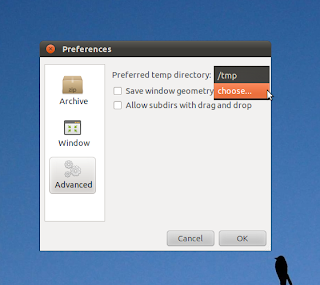
*. A separate "preferences" window (above screen-shot) that lets you configure things such as - ask for conformation while deleting files, change temporary folder location (very useful if you had a "data-full partition" thus the archive manager most probably be unable to extract the content otherwise), show/hide archive commenting, etc.
You can install the Xarchiver in Ubuntu 11.04 Natty Narwhal, 10.10 and 10.04 by entering the below command in your Terminal window.
sudo apt-get install xarchiver
That should do the trick. Enjoy your new and powerful Xarchiver for creating e-mail archives, out of multimedia files or password protected self extracting ones which makes exchanging archives much more easy and secure + for many more of your other nerdy needs :).
Available link for download