Hi guys today i am going to show you how to flash your samsung galaxy y.
Follow the instruction carefully and you will learn how to flash your samsung galaxy y via odin.
Safety Features:-
Remove your Memory Card and Sim Card.
Hard Reset your Mobile by using this code *2767*3855#.
Your Mobile Phone should be Charged more than 80%.
Download Links:-
Odin
Stock Rom
Requirements:-
A running computer with USB Driver installed.(install kies first)
Download Odin and Stock Rom file.
Steps of Installation:-
Download and Extract both files.
After unzipping Stock Rom file you will get these three files
PDA _S5360 _DDLK2.tar,
MODEM_ S5360 _DDLK2.tar &
CSC_S 5360 _DDLK2 .tar
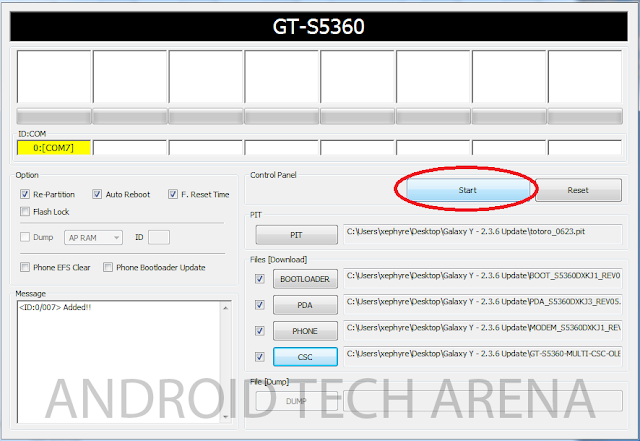
Now open Odin and select Files as
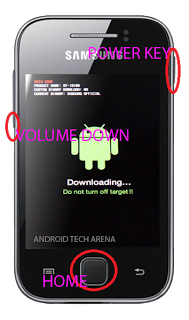
Now you have entered download mode and continue by pressing Volume Up Button.
Connect your mobile to your PC by using data cable.
Now make Sure you are getting the yellow box on odin.
IF it is showing a yellow box then click start,
Now let odin do his work and do not touch your mobile till the yellow box is changed into a green box.
Green box means that you mobile has successfully been flashed.
Follow the instruction carefully and you will learn how to flash your samsung galaxy y via odin.
Safety Features:-
Remove your Memory Card and Sim Card.
Hard Reset your Mobile by using this code *2767*3855#.
Your Mobile Phone should be Charged more than 80%.
Download Links:-
Odin
Stock Rom
Requirements:-
A running computer with USB Driver installed.(install kies first)
Download Odin and Stock Rom file.
Steps of Installation:-
Download and Extract both files.
After unzipping Stock Rom file you will get these three files
PDA _S5360 _DDLK2.tar,
MODEM_ S5360 _DDLK2.tar &
CSC_S 5360 _DDLK2 .tar
Now open Odin and select Files as
- PDA - "PDA" file.
- PHONE - "MODEM" file.
- CSC - "GT-s5360- MULTI-CSC" file.
Now you have entered download mode and continue by pressing Volume Up Button.
Connect your mobile to your PC by using data cable.
Now make Sure you are getting the yellow box on odin.
IF it is showing a yellow box then click start,
Now let odin do his work and do not touch your mobile till the yellow box is changed into a green box.
Green box means that you mobile has successfully been flashed.