Friday, March 10, 2017
Guide to Usenet Usenet – download faster than torrents Fastest download speeds
Guide to Usenet Usenet – download faster than torrents Fastest download speeds
I am pretty much bombarded with questions regarding Usenet in my seminars and on my email, so I thought why not to cover a guide over it. Usenet is the granddaddy of networks, yep, I said it. You might flame me by citing Arpanet and some other primitive networks, but then again, it was Usenet which prevailed massively before the modern Internet and was the hip thing which allowed to share binary files,movies (even your fantasy p**n stuff ), games and a lot more. Basically Usenet was a kind of BBS where the first generation of geeks shred what they had, in the 80’s, someone came with an idea of sharing binary files (read:your standard files) over Usenet and there we go, it became a phenomenon. Most people joined Usenet so as to get access to those files and trust me; it was a phenomenon to witness.

Usenet is based on decentralized servers which share content with each other over UUCP protocol, and has content arranged in a hierarchical manner.
- Enough theory, lets get on to some interesting facts (in context with torrent junkies and conspiracy theories :P ):
- Usenet is faster than the fastest of Torrent Trackers, BLAZING fast speeds,and I mean it.
- Usenet has a lot more data categorized there to be picked by the worthy then your best Torrent tracker can ever get.
- No Seeding, No Uploading, Instant Speeds ! It’s a wonderland for 24X7 downloaders.
- Usenet is dying, and whatever is left of it, is quite different from what it originally was.
- Usenet is dying because government can’t control it.
Ridiculously , we all have heard of Usenet , but as far as I know people, nobody uses it. I got my first slice of it in 2007 and since then, I have loved every bit of it. It’s an outstanding archive of data which you may not find over Internet, yep, it’s that good.
The primary reason Usenet is not so popular because people just don’t want to use their heads. They just want a point-click-download option to download their files. As compared to traditional downloading and torrents, Usenet is a bit different to setup, and I will tell you how to set it up, really.
Step 1 - Choose Your Usenet Service
Long ago, ISP’s hosted Usenet binaries and provided access to Usenet and news servers. They were happy with people connecting and subscribing to these services and infact actually supported by giving long retention time (the time for which a file is hosted over a Usenet server) to the binaries. But then the advances in technology gave people amazing speeds and faster broadband connections and they literally abused by downloading like there was no tomorrow. Further the government was pissed off by the amount of illegal data (read:child p**n and sm*t) hosted there and decided to shut it off, although not fully successful, the ISP responded by putting bandwidth constraints , restricted content and a lot of weird measures.

- The retention time.(300 days +)
- The number of parallel connections (more connections, more speed, but it stops meaning anything unless you are on a 100Mb pipe)
- Download limits (amount of data you can download..obviously)
Step 2 - Choose your Client
Again, just like you use utorrent / xunlei to download your torrents, you need a client to download yor files through Usenet. Someties you may have noticed a torrent file which is broken into 20 MB rar files each, probably that file has been downloaded from Usenet and uploaded to torrent, as in Usenet a file can not be uploaded beyond a fixed size, that too in a compressed form. The real trouble starts to download and organize those files, but fear not, thats what are Usenet clients for; they download and join those compressed files into one automatically. My favorite one is SABnzbd, and I will be covering the rest of guide taking it in view. Like torrent files (.tor), in Usenet NZB files are used to point out and download files, your client will be able to figure it out.
Download SABnzbd
Run the program and SABnzbd will open in a browser window.

Now click on “Config” tab and click on “servers”

Enter the server settings your Usenet provider gave you after signup (Astrawebs at left). Staying in the "Config" page, click "Folders"

Select the folder where you want to download files and the temporary files folder (pretty standard stuff) .Also choose a "Watched" folder where the NZB files will be placed and SABnzbd will know what you want it to download. Make it a place thats easy for you to save to, from a browser.
Once done, you are ready to explore Usenet.
Step 3 – Downloading files
“Usenet is like a herd of performing elephants with diarrhea- massive, difficult to redirect, awe-inspiring, entertaining, and a source of mind boggling amounts of excrement when you least expect it”
- Gene Spafford
Yep..Usenet is an incomprehensible mess. Thats why they created search engines like Newzbin (paid and invite only), NZB.org, Binsearch, Newsleach to find your files using NZB format and to download it. Think of it like torrent search engine where you find your favorite files.
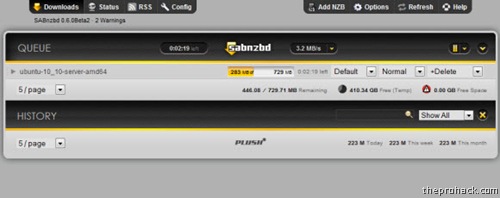
Once you find your NZB, download it to the your "Watch" directory and SABnzbd will take care of it . Or you can download it wherever you want, and add it manually to SABnzbd by going to "Add File". Once done, you will have something like this -

Its working! And yes, its really going that fast.
But if If its not downloading, you may need to check your server settings as some ISPs block the default port, 119. WOrry not, you can use another one that your provider supports. 8080,1818 are some common ones.
Once downloaded, it will automatically be joined and served with chilled beer (just kidding)
Thats Usenet :)
Enjoy…
Available link for download

Thursday, January 26, 2017
How to make your internet connection faster
How to make your internet connection faster
How to make your internet connection faster ?

- Auto-update of Installed software can run as a background process and eat up your available bandwidth to make your browsing experience slower. So you may turn off the auto-update of installed software and Windows to cut down the bandwidth utilization.
- While we browse, we should look and stop any background application eating the available bandwidth. So many times I have found my P2P client is running in background, (under taskbar) hiding from my eyes and uploading the Linux distro which I have put on for download the other night.
- Malware like Virus or a Spyware can always slow you down by utilizing your Internet connection for their own use. Always make sure you are using an up-to-date AntiVirus and AntiSpyware protection to keep the PC free of Virus and Spyware !! Mind you, your Windows comes with a built in AntiSpyware called Windows Defender (Vista or Win 7, in case of WinXP, one can download free)
- Use of a firewall can help to stop unwanted apps to access the Internet.
- If you need to download a large file, say about 50 MB or more, always try and use a File Transfer / download manager. There are many free options available, FlashGet / Free Download Manager (FDM) / Internet Download Manager (IDM).
Available link for download
Sunday, November 13, 2016
How to Make Internet Faster
How to Make Internet Faster
How to make your internet connection faster ?
- Auto-update of Installed software can run as a background process and eat up your available bandwidth to make your browsing experience slower. So you may turn off the auto-update of installed software and Windows to cut down the bandwidth utilization.
- While we browse, we should look and stop any background application eating the available bandwidth. So many times I have found my P2P client is running in background, (under taskbar) hiding from my eyes and uploading the Linux distro which I have put on for download the other night.
- Malware like Virus or a Spyware can always slow you down by utilizing your Internet connection for their own use. Always make sure you are using an up-to-date AntiVirus and AntiSpyware protection to keep the PC free of Virus and Spyware !! Mind you, your Windows comes with a built in AntiSpyware called Windows Defender (Vista or Win 7, in case of WinXP, one can download free)
- Use of a firewall can help to stop unwanted apps to access the Internet.
- If you need to download a large file, say about 50 MB or more, always try and use a File Transfer / download manager. There are many free options available, FlashGet / Free Download Manager (FDM) / Internet Download Manager (IDM).
Available link for download