Showing posts with label bypass. Show all posts
Showing posts with label bypass. Show all posts
Monday, February 6, 2017
How to Bypass BIOS Password
How to Bypass BIOS Password
Recover from a CMOS memory-affecting virus or work around a boot-time password by making BIOS forget all it once knew.
A PC goes through a process when it is first turned on: the Power-On Self-Test, or P.O.S.T. Some system boards provide security measures that demand a password before beginning the P.O.S.T. process or allowing you into the BIOS setup program.

The original IBM-PC (1981) did not provide any security measures or a BIOS setup program; all it had was a P.O.S.T. If you needed to configure a PC, you did it with switches and jumpers. A program to set up the system BIOS and configuration did not come along until the IBM-PC/AT (1984), and it had to be run from a special boot-up diskette. The idea of providing a user interface and access to the system configuration settings within the BIOS did not come along until about 1986. Today no PC system is made without this valuable built-in setup feature. Eventually, the security feature of password-protecting access to the system came along.
If, after turning on your PC, you are prompted for a password instead of greeted with a fancy logo screen or the technical gibberish that suggests the system is getting ready to let you use it, then a security feature has been turned on that we call a " pre-boot password." Without the right password to get past this point, the system is basically dead in the water—game over, do not pass go and collect $200—unless or until you reset the BIOS setting. But how do you do that without getting past the password to the setup program?
This hack is also very effective for putting the system board back into "factory stupid" mode where it knows nothing about your system components and forgets all of your parameter tweaks. This is very useful if youve performed a hack that renders the system unbootable or unstable.
The goal is to get the system to forget that it needs a password and forget what the password was. The password data is stored with the rest of the system configuration data in a small amount of memory that is kept alive using a small battery or internal power cell. To clear out the data, you need to remove the power from this memory element. This means the system will also lose any system configuration that was saved. Youll need to later reconfigure the system parameters so you can boot your operating system.
For this and many subsequent hacks, you will be working with electrical components inside your PC. We want you to get through the entire book and enjoy your computer for a long time without risk of electrical shock or component damage. When the cover is off your PC and you are removing or adding components—be they add-in cards, RAM chips, CPUs, or fans—especially when you are handling the screws to hold things in place, ALWAYS turn the PCs power OFF and unplug the power cord from the back of the PC.
Disconnecting the power cord removes the risk of exposure to high voltages and accidentally turning the power to the system board on. Disconnecting the power cord also allows the PC chassis to become ungrounded, which reduces the potential difference between any static charge in your body and the chassis so static shocks are less likely.
It is also recommended that you use an anti-static wrist strap connected to the PCs chassis for further protection of delicate electronic components.
To perform this hack you will need:
A #1 or #2 Phillips-head screwdriver, or (less likely) a T-15 TORX driver or a 1/4" hex nutdriver, to open the case
Needle-nosed pliers if you are working with jumpers
A small flashlight or headlamp
With tools at hand, perform the following steps:
Turn the PC off (this means a total shutdown, not merely standby or hibernate mode) and disconnect the AC power cord.
Remove the cover from your system (this step may require tools, undoing a thumbscrew, or flipping a latch or two).
Refer to the user manual for the motherboard to find out how to "reset CMOS" memory. You may also find a label for specific jumper or switch settings marked on the system board.
Change the switch setting or jumper position to a specific position or remove the jumper entirely as prescribed in the manual to clear or reset the CMOS memory.
Wait 20-30 seconds for the memory to clear out from lack of power.
After 20-30 seconds put the switch or jumper the way it was before for normal use.
Reconnect the power cord and start up the system to see if the settings have changed to defaults.
Shut the PC down, disconnect the power cord, replace the cover, reconnect the power, and power up the PC.
Enter the BIOS setup program to configure the system as needed. This may include setting the date and time, selecting disk drive parameters, and selecting which devices the system uses to boot up with first.
If your system does not have a "reset CMOS" jumper or switch , the only option is to locate and remove the coin-style battery cell (or on some very old PCs, the battery pack), as shown in Figure 1-2, that provides the power to the CMOS memory.
System board with coin-style battery used to retain CMOS memory
If, after turning on your PC, you are prompted for a password instead of greeted with a fancy logo screen or the technical gibberish that suggests the system is getting ready to let you use it, then a security feature has been turned on that we call a " pre-boot password." Without the right password to get past this point, the system is basically dead in the water—game over, do not pass go and collect $200—unless or until you reset the BIOS setting. But how do you do that without getting past the password to the setup program?
This hack is also very effective for putting the system board back into "factory stupid" mode where it knows nothing about your system components and forgets all of your parameter tweaks. This is very useful if youve performed a hack that renders the system unbootable or unstable.
The goal is to get the system to forget that it needs a password and forget what the password was. The password data is stored with the rest of the system configuration data in a small amount of memory that is kept alive using a small battery or internal power cell. To clear out the data, you need to remove the power from this memory element. This means the system will also lose any system configuration that was saved. Youll need to later reconfigure the system parameters so you can boot your operating system.
For this and many subsequent hacks, you will be working with electrical components inside your PC. We want you to get through the entire book and enjoy your computer for a long time without risk of electrical shock or component damage. When the cover is off your PC and you are removing or adding components—be they add-in cards, RAM chips, CPUs, or fans—especially when you are handling the screws to hold things in place, ALWAYS turn the PCs power OFF and unplug the power cord from the back of the PC.
Disconnecting the power cord removes the risk of exposure to high voltages and accidentally turning the power to the system board on. Disconnecting the power cord also allows the PC chassis to become ungrounded, which reduces the potential difference between any static charge in your body and the chassis so static shocks are less likely.
It is also recommended that you use an anti-static wrist strap connected to the PCs chassis for further protection of delicate electronic components.
To perform this hack you will need:
A #1 or #2 Phillips-head screwdriver, or (less likely) a T-15 TORX driver or a 1/4" hex nutdriver, to open the case
Needle-nosed pliers if you are working with jumpers
A small flashlight or headlamp
With tools at hand, perform the following steps:
Turn the PC off (this means a total shutdown, not merely standby or hibernate mode) and disconnect the AC power cord.
Remove the cover from your system (this step may require tools, undoing a thumbscrew, or flipping a latch or two).
Refer to the user manual for the motherboard to find out how to "reset CMOS" memory. You may also find a label for specific jumper or switch settings marked on the system board.
Change the switch setting or jumper position to a specific position or remove the jumper entirely as prescribed in the manual to clear or reset the CMOS memory.
Wait 20-30 seconds for the memory to clear out from lack of power.
After 20-30 seconds put the switch or jumper the way it was before for normal use.
Reconnect the power cord and start up the system to see if the settings have changed to defaults.
Shut the PC down, disconnect the power cord, replace the cover, reconnect the power, and power up the PC.
Enter the BIOS setup program to configure the system as needed. This may include setting the date and time, selecting disk drive parameters, and selecting which devices the system uses to boot up with first.
If your system does not have a "reset CMOS" jumper or switch , the only option is to locate and remove the coin-style battery cell (or on some very old PCs, the battery pack), as shown in Figure 1-2, that provides the power to the CMOS memory.
System board with coin-style battery used to retain CMOS memory

Follow Steps 1 and 2 above, locate the battery, and remove it. Leave the battery out of the system for 20-30 seconds, replace it, and start up the system. The CMOS memory in some systems may retain settings longer than others. If the CMOS memory does not clear and youre still stuck, you may need to leave the battery out for several hours before reinstalling it.Once the system is able to perform P.O.S.T. and to start booting up the system, you will need to get into the Setup program for the BIOS and make a few basic adjustments, such as:
Setting the date and time
Selecting auto-detect or manually setting specific parameters for IDE hard drives
Setting the boot-device order—diskette drive, hard drive, CD-ROM, etc.
If you expect to perform more hacks with jumpers, switches, cables, chips, or disk drives, youll probably find it convenient to leave the cover off your PC, but beware: we do not want to cause more trouble than were trying to solve. You could be exposing yourself to dangerous voltages (inside the power supply) or exposing the internal wires and connections to disk drives and plug-in cards to your tools, screws, and other wires that could come in contact with them. At this stage, spilling your favorite beverage or dropping your tools anywhere inside the PC chassis is not advised.
Available link for download

Thursday, November 17, 2016
How to Bypass Photo Tag verification 100 working
How to Bypass Photo Tag verification 100 working
How to unlock facebook blocked account with proxy software.
Are you getting this error
" Please Confirm your Identity
In order to proceed, facebook need to verify that you are the owner of this account. To do this, identify the people in the following the series of photos. or We are going to show you some photos, of peoples you are connected on facebook to unlock your account, correctly identify who they are. If you are not sure about a photo click skip"

Hi friends today am going to share with you an interesting and very easy method to verification of photo verification tag identity on your facebook account that are temporarily blocked by doing some unusually activities with your account.

Why Your account blocked?
There are so many way that are caused by account banned or blocked as like adding naked images, porn video, adding huge friends, So as will as other cause is that there are some guys who have made fake facebook like page or profile account on different celebritys name or brands to adding his/her fake information. But facebook not allow to doing this kinds of activities. So the result when you try to do above kinds of unusually activities with your account as like adding more friends, sending bulk requests, making multiple facebook like page on different types or names. So when facebook identity and trace that you are doing fake activities as like a machine or Robots then, it will be blocked your account for temporarily on your current location or IP and tell you to do a photo tag verification.

What is photo tag verification?
Whenever you add a new post then, you mention your friends into your post this is called tag means you are with your friend by posting this news or post. But when your account blocked then, facebook ask you some question as like whos are that, you have tag into your posts? So if you are realy know his/her name and also profile photo then you can be easily identify and solve this problem, otherwise you try to image identity again and again and finally you got an error as like. "Your hourly image tag verification limit exceed!" So this time you will not be able to open your facebook blocked account.

How to solve image verification method by using proxy?
So today am going to share with you a working trick that will be help you to getting back youre temporarily blocked account within 2 mints.
Note: If your account is blocked than never try to try for unlocking by fake tricks otherwise it will be banned permanently.
What are required to solving photo tag verification?
There are some things that will be need to doing this method complete without any kinds of error that are given below.
Computer with keyboard and Mouse.
Internet web browser as like Google Chrome.
Internet connection.
Dotvpn Free proxy for Google chrome.
Mobile number that currently on near with you.
These are all above requirement that will be need to unblocking facebook account. So now am going to share step by step method with screenshot to doing this method completely with easy understandable process that are follow.
First of all open google chrome and search "DotVPN For google Chrome" Or Click here.
Now add "DotVPN to Google Chrome" and activate it by Your Email ID and Pass for future used.

Click on Dot VPN Proxy icon from google chrome.
Now Click on Connect.
Now you need to change your current location to "Japan"

Now you need to open Mobile facebook "m.facebook.com"

Now you need to Enter Email id of your blocked account.
Now inter your blocked account password.
Now you need to click on Login.

In this step Enter your active mobile number that are not used before on facebook.
Now you need to changer country code with your own.
Now click on "Continue"

After doing above step you will be get a code on your mobile number with text.
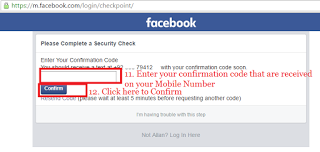

Now Enter your confirmation code that received on your mobile number.
Now click on "Confirm" Button and follow next step

Now click on "Save Setting" and process next step.
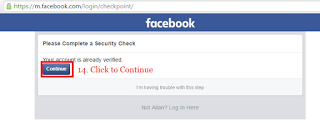
Now you account is activated click on "Continue" and process next step.

Now click on "Okay" You have successfully get back your account

Above screenshot will help you to enhance security if you want then click on "OK" or click "Not Now"

Now you have get back successfully your facebook blocked account or page.

In this last step you can be re open your facebook as desktop mode and enjoy to chating with friends.
So friends, I hope you will be understand given above method and unlocked or unlocked your facebook temporarily locked account within 2 mints. If you agree and open your account successfully then share this post in facebook and twitter.
Available link for download
Subscribe to:
Posts (Atom)