Saturday, April 29, 2017
How to easy recovery from lost partition
How to easy recovery from lost partition


?????????? Free ?????????? ?????????????????? Partition Recovery ????????????? EASEUS ??????? ??????????????????? ?????????????????????? Partition ????????? data ????????? unallocated ??????????????? ???????????????????????
Download for:
Active@Partition Recovery
EASEUS Partition Recovery
Available link for download

Sunday, April 16, 2017
How to Import mail and contacts from Yahoo Mail to Gmai
How to Import mail and contacts from Yahoo Mail to Gmai
How to Import mail and contacts from Yahoo Mail to Gmai

Importing data from one email service provider to another can be time-consuming and complicated, with lots of glitches. But it doesn’t have to be that way. If you want to switch from Yahoo Mail to Gmail and import your contacts and mailbox contents, Gmail has made this process easier than ever.
Here’s how to switch from Yahoo to Gmail:
1. Open the Gmail account andclick the gear icon placed on the top right of the page.2. After clicking on the settings button, you’ll see “settings” in the dropdown list. Click on it.

3. After that click on the “Accounts and Import” Tab.You will find it in the middle of the page.

4. Then click on “Import mail and contacts“. It will then ask you for the password; enter the password of your yahoo account.

5. Decide the import option that you want to use. You will have to chose from options; import all your contacts, and old mail, or some portion of thereof.

Only current messages will be imported from the inbox and will be automatically labeled with the name of your yahoo account.

Tips & Warnings
- After four months of an account receiving no activity, Yahoo! deactivates that account, so if you intend to keep your Yahoo! account alive for an extended period, be sure to log in every week or so.
- Check your old Yahoo! account on occasion to make sure that no one important is sending email to that address. Alert anyone who is sending mail to that account to update their address book to reflect your new address.
Available link for download
Friday, April 14, 2017
How to Create PDF files from Microsoft Word
How to Create PDF files from Microsoft Word
Creating PDF files by using the Adobe PDF printer.
After you specify your printing options, you can create a PDF file from the Word document.
To create a PDF file using the Adobe PDF printer:
1. In Word, choose File > Print.
 2. Choose Adobe PDF from the Printer Name pop-up menu. In this example I am using primopdf
 3. Click OK, and specify a filename and location for the PDF file, and then click Save.
 4. Done.
Available link for download
Sunday, April 9, 2017
How to get paid apps for free from Playstore
How to get paid apps for free from Playstore
-How to get paid apps for free from Playstore
-In this video I explain how to have Android paid apps for free
-Dans cette vidéo je vous explique comment avoir les applications payantes Android gratuitement

Available link for download
Tuesday, April 4, 2017
How To Print From an iPad
How To Print From an iPad
Having trouble printing from your iPad? This is the easiest way to print from and Apple iPad. Its so simple a caveman could to it.

Available link for download
Thursday, March 16, 2017
How to Download MP3 Songs from SoundCloud for Free
How to Download MP3 Songs from SoundCloud for Free
Sound Cloud is known for the best exotic tracks collection uploaded by many DJ professional and other music freaks, so there database is really huge but downloading songs might have some limitation like I guess if you are creating a free account then you might have a limit of downloading 100 Songs/month and that too not all songs are available for free downloading.
Available link for download
Saturday, March 4, 2017
How to Make Money From Your Blog – Direct Methods
How to Make Money From Your Blog – Direct Methods
Having thought through whether you should blog for money it is now worth taking a look at some of the different models for doing so. I tend to break the different models that bloggers are using to make money from blogging into two areas – Direct and Indirect methods. Direct Income Earning Methods - these methods are where a blogger earns an income directly FROM their blog. Indirect Income Earning Methods – these methods are where a blogger earns an income BECAUSE of their blog. Most blogs tend to fall into one or the other of these methods – although there is nothing to stop bloggers experimenting with elements of both ( Ive seen a few bloggers get into trouble with this.
In this post Ill look at 8 direct income earning methods and in the next post of this series Ill explore indirect methods. Please note that on occasion in the following post there will be few affiliate links to services that I use and have had some success with. These will be marked with (aff) after them. Direct Income Earning Methods for Bloggers1. AdvertisingThere are many ways of selling advertising space on a blog (this could almost be a series of its own) but some of the different advertising options that I see bloggers experimenting with include:
2. SponsorshipAnother form of advertising that a smaller number of bloggers are using is to find their own advertisers. All of the above systems have the advantage of finding you advertisers (or at least assisting in the automation of ads to your blog) but as your blog grows in profile and influence you might find other options for private deals come up. The big blog networks have people dedicated to the task of finding advertisers (often working through ad agencies) but smaller bloggers might find this worthwhile also. Ive been selling ads on my Digital Camera Blog for two years now and as its grown in traffic and profile and managed to attract larger companies (who are willing to pay more) to buys space. Currently the blog features ads from Adobe who have bought a combination of banner, newsletter and text ads. The key if youre going to take this approach is to target advertisers in your niche that have products that closely relate to what youre writing about. There are a variety of ads that you can offer them including banner ads, buttons, text links, mentions in newsletters and even individual post sponsorships. I would highly recommend that you always make it clear to readers that your post is a sponsored one when youre writing a sponsored post.
3. Affiliate ProgramsAffiliate programs are where you take a commission for referring a reader who purchases a product or service to a company. Probably the most common of these for bloggers is Amazon which has tens of thousands of products that you can link to (I reviewed it here). Other affiliate programs that represent many different companies and products include Linkshare, Commission Junction and Clickbank. Affiliate programs take some work if you want to get the most out of them (perhaps more work than advertising) but can be lucrative if you match the right program with the right blog/topic. If you want to explore affiliate programs more you might like to read 10 tips for using affiliate programs on you blog. 4. Selling/Flipping BlogsThe idea of selling (or flipping) your blog is one that many bloggers have in the back of their minds for one day but in reality it is not something that is overly common… yet (I think this is changing). Probably the largest sale is that of Weblogs Inc (a network of blogs) which sold to AOL for a reported $25 million. Of course this is the stuff that most of us can only dream of – but there are examples of smaller blogs being sold, either privately or via auctions on sites like eBay and SitePoint. One such auction was that of the Blog Herald which took place here. Starting a blog with the main goal of selling it down the track is one that Ive heard of a number of bloggers doing but few have been successful. Rather than starting with this intention I think if you start with the intention of building a quality site that has a large readership and its own good income stream you are more likely to find buyers down the track.
5. Donations and Tip JarsA very small number of blogs have a history of making good money with these (Jason Kottke being one of them). To be successful with asking for money from readers youll want to have a large and loyal readership (and a rich one might help too). Most bloggers just dont have the critical mass or the cult following to make it work. 6. MerchandiseAnother method that some blogs use with reasonable effect is to sell T-Shirts, Mugs, Stickers etc with the blogs name, logo and/or taglines on it. This is another idea that will probably only work if you either have a brilliantly designed merchandise range and/or you have a cult-like status as a blogger with some fanatical readers who are a little obsessive about your blog. Some blog topics lend themselves to this more than others. 7. Selling SubscriptionsThe idea of charging readers for content is one that surfaces from time to time. While there are numerous websites around the web that do this successfully (community membership sites) Im yet to see many (any) blogs do it well. The problem that most bloggers who have tried it have run into is that most topics that you could think to start a blog about already have free sites available. To make it succeed you would need to have some sort of premium/exclusive content and/or real expertise on a topic.
8. Blog NetworksAnother emerging income source for bloggers are blog networks. There are two ways to make money here. Firstly you can start a network and contract bloggers to write for you or secondly you might like to join a blog network as a writer. There are many networks out there and all have their own strengths and weaknesses. Ill attempt to write a post on what to think about when youre looking at whether to join a network later in this series. Next in the series well look at indirect ways of making money because of your blog. Source:http://www.problogger.net/archives/2006/02/22/making-money-from-your-blog-direct-methods/ |


Available link for download
Wednesday, February 22, 2017
How To Hide Whatsapp Images Videos From Gallery Smr Trixx
How To Hide Whatsapp Images Videos From Gallery Smr Trixx
How To Hide Whatsapp Images & Videos From Gallery Smr Trixx

Methods To Remove WhatsApp Images From Gallery
Steps For Android Phone Users


Steps For An iPhone Users
- Just go to you phone settings-> Privacy->Photos->Untick WhatsApp.
- After following the above step you will not see your WhatsApp images in Gallery.

Available link for download
Saturday, February 18, 2017
How Bloggers Make Money from Blogs
How Bloggers Make Money from Blogs
My Personal Income StreamsAs an update to this post Ive more recently written one on How I make Money Blogging which highlights the most profitable ways that I use blogs to generate income. Ive also written extensively on how bloggers make money in ProBlogger the Book.
How do bloggers make money from blogs?Ive been reflecting this week about the amazing diversity of opportunities that are opening up for bloggers to make money from blogging. Ive long advised that bloggers seeking to make money from blogging spread their interests across multiple revenue streams so as not to put all their eggs in one basket. The wonderful thing is that this is becoming easier and easier to do 2005 has seen many options opening up. I thought Id take a look at some of the methods that bloggers are currently using to make money through blogs.
Income Streams for Bloggers – How to Make Money BloggingAdvertising Programs – Perhaps the most obvious changes in the past few months have been with the addition of a variety of viable advertising options for bloggers looking to make money from their blogs. The most common way bloggers seem to earn money online is via the contextual ad program from Google – Adsense. A more recent addition that many are using successfully are Chitika. RSS Advertising – The past 12 months have seen some advances in RSS Advertising also. Im yet to hear of any bloggers making big money blogging through it to this point – but as improvements are made to the ad programs exploring this Im sure well start to see examples of it being profitable. Sponsorship – In addition to the array of advertising programs that are available to join there is a growing awareness in the business of the value and opportunity that exists for them to advertise directly on blogs. Im hearing more and more examples of this and have been fortunately to have a couple of ad campaigns of my own in the past month – one with Adobe a couple of weeks ago and another just completed with Ricoh for a new digicam over at my Digital Camera Blog. These are not isolated cases – as I say I know of many blogs exploring sponsorship with advertisers at present and suspect well see more of it in the year ahead. Sponsorship is also happening on a post by post basis with some bloggers being paid to write on certain topics by companies – either in one off or a regular fashion – and they are able to make big money from their blogs doing so. Affiliate Programs – There are larger affiliate programs like Amazon, Linkshare, Clickbank and Commission Junction but also literally thousands of others from the large to the very small. Digital Assets – Increasing numbers of bloggers have been developing other digital assets to support and add revenue streams to their blogs. By this I mean that Im increasingly seeing e-books, courses and tele-seminars being run by bloggers. This type of activity will only increase in future – in fact this week Ive seen numerous examples of bloggers running courses. Blog Network Opportunities – with the rise in popularity of Blog Networks – bloggers are also being presented with more places to earn an income from their blogging – by writing for and with others. While it might be difficult to get a writing gig with one of the bigger networks – there are plenty who are always asking for new bloggers to join and who are willing to pay bloggers using a variety of payment models. While there are distinct advantages of blogging for yourself – blogging for an established network who will handle a lot of the set up/promotion/admin/SEO etc has its advantages also. More and more bloggers are combining writing for themselves on their own blogs with taking on blog network blogs as additional income streams. Business Blog Writing Opportunities – as blogging has risen in its profile as a medium more and more businesses are starting blogs. Many of these companies have internal staff take on blogging duties – but an increasing number of them are hiring specialist bloggers to come on and run their blogs. I know of a number of bloggers who in the past month or two have been approached for such paid work. Check out the ProBlogger Job Board if youre looking for this type of work. Non Blogging Writing Opportunities – Also becoming more common are bloggers being hired to write in non blogging mediums. Manolos recent coup of a column in the Washington Post is just one example of this as bloggers are increasingly being approached to write for newspapers, magazines and other non blog websites. Along side this is the rise of bloggers as published book authors – this is to the extent that one blogger I spoke with this week complained to me that they were one of the few bloggers than they knew who didnt have a book deal! Donations – Tip Jars and donation buttons have been a part of blogging for years now but this last year saw a number of bloggers go full time after fund raising drives. Perhaps the most high profile of these was Jason Kottke of kottke.org who through the generosity of his readership was able to quit his job and become a full time blogger. Flipping Blogs – Also more common in 2005 was the practice of Blog Flipping – or selling of blogs. This has happened both on an individual blog level (I can think of about 20 blogs that sold this year) but also on a network level (the most obvious of these being the 8 figure sale of Weblogs Inc to AOL). Merchandising – My recent attempt to sell ProBlogger.net T-shirts wasnt a raging success, but it is an example of how an increasing number of bloggers are attempting to make a few extra dollars from their blogs by selling branded products through programs like Cafepress. While I didnt have a lot of success with merchandising – quite a few larger blogs are seeing significant sales – especially blogs with a cult following. Im not at liberty to discuss details – but I know of one largish blog which will see sales over $20,000 in merchandise for the calendar year of 2005. Consulting and Speaking – While it has been popular for established consultants to add blogs to their businesses were also starting to see bloggers with no consulting background able to make money by charging readers for their time in consulting scenarios BECAUSE of the profile that their blogs have built them. Blogging has the ability to establish people as experts on niche topics and we all know the value of being perceived as an expert. I spoke to one blogger last month who charges himself out at over $200 an hour for speaking and consulting work – his area of expertise was something that he knew little about 18 months ago – but through his blog hes become a leader in his field and a minor celebrity in his industry. As time rolls on there are more and more ways that bloggers make money from their blogs opening up. Feel free to suggest your own ideas and experiences in comments below. Update: Looking for more information on how to make money blogging? Heres a post I wrote talking about my own experience – particularly looking at the top ways that I make money from blogs. Also check out these resources on how to set up a profitable blog:
Source:http://www.problogger.net/make-money-blogging/ |


Available link for download
Saturday, February 11, 2017
Hacking Tools Techniques and How to Protect Your Network from Them
Hacking Tools Techniques and How to Protect Your Network from Them
Boyd Aaron Sigmon
Dr. Phil Lunsford
ICTN 4040 Section 601
19 April 2009
Hacking Tools & Techniques and How to Protect Your Network from Them
Hackers today use a wide variety of tools and techniques to gain entry into
networks across the globe, stealing and destroying confidential data, as well as defacing
public websites, writing malicious code, and bringing systems and networks to their
knees. These attacks can sometimes cost companies thousands of dollars in downtime,
resources, and manpower, not to mention the possibility of having secret data stolen and
leaked. The purpose of this paper is to discuss some of the most common tools and
techniques hackers use today, and how you and your company can protect your
infrastructure from these attacks, as well as broaden your knowledge on hacking as a
whole.
The true meaning of hacking is to increase the capabilities of an electronic device,
and use it beyond the original intentions of the vendor. Hacking began in the 1960s,
when a group of students at MIT were tweaking electric trains to go faster and be more
efficient. Then, it wasn’t long before a group of these guys started using their skills in
the mainframes at MIT. In the 1970’s a new type of hacker emerged, called a
“phreaker”, who could hack telephone systems and make phone calls for free. By the
1980’s, hackers were starting to use computers more and more, and started using Bulletin
Sigmon 2
Board Systems to share stolen computer passwords & credit card numbers, which led to
the Computer Fraud and Abuse Act being passed by Congress in 1986. Once the internet
had its surge of users in the 90’s, hacking was becoming more main-stream and the
number of hackers around the world started growing rapidly (Hackingalert.com).
As hacking has become more and more popular over the years, experienced
hackers and security professionals have written programs that have enabled less
experienced hackers, also called “script kiddies”, to easily achieve attacks on systems and
networks. Most of these tools were originally designed for use by security professionals
to test their networks for vulnerabilities, but have since become a double-edged sword.
Identified below, are 6 of the most popular hacking tools and techniques currently used
today.
1. Port Scanners – Port scanning, also called “Port knocking” is
technique used by hackers to find an opening in to a remote system.
There are over 65535 TCP and UDP ports in the TCP/IP suite that a
host can use to communicate with the Internet. A remote attacker can
use a tool such as Nmap to scan for open ports and try to connect to
that system using it’s IP address and open port numbers by using telnet
or ssh. Tools like Nmap can also detect running processes and the
Operating System (OS) version that the system is using, so they could
exploit vulnerabilities associated with that process or OS. Also,
experienced attackers can use port scanning techniques that can easily
go undetected by most Network Intrusion Detection Systems.
Sigmon 3
2. Vulnerability Scanners – Vulnerability scanning is a tool & technique
that can have a use that is both good and bad. It was originally
designed by security professionals to find weaknesses in their network,
but has since then, been used by attackers to detect those same
weaknesses. Attackers can exploit a vulnerability to gain entry to a
system, and obtain user to administrator level access, as well as cause
the system to crash maliciously. Nessus is one of the most popular
vulnerability scanners used today, and is an open source product that is
available to download for free over the internet. This scanner is
capable of testing services running on non-standard ports, and multiple
instances of a service, as well as detecting patches and updates that
have not been applied to systems.
3. Packet Sniffers – A packet sniffer is a network analyzer that can either
be used rightfully by a network administrator to monitor traffic on their
network, or can used by an attacker to sniff out packets on a network
that could contain valuable information passed in plain-text, such as
usernames and passwords (Bradley). A Packet sniffer can only be used
to sniff out packets on the subnet that the attacker is on, but it can also
be hard to detect because of their passive nature. There are about a
dozen of popular packet sniffers available today for free on the internet
like Wireshark, TCPDump, and Cain & Abel, as well as wireless
sniffers such as Kismet and Netstumbler, which sniff out packets on
wireless networks and even look for open access points. Also, one of
Sigmon 4
the most popular Network-Based Intrusion Detection tools, called Snort
can even be used as a packet sniffer.
4. Rootkits – Rootkits are a tool or program that can give an attacker
administrator-level access on a system, as well as give them the ability
to hide their intrusion by altering log files
(SearchMidmarketSecurity.com). Rootkits can also contain spyware,
and can be hard to detect by hiding themselves in files and directories
that cannot be seen by simply browsing through a folder structure, or
even by using a Host Based Intrusion Detection System.
5. Password Crackers – A password cracker is a tool that an attacker can
use to gain access to system by using different combinations of
sequences to guess usernames and passwords. There are many popular
password cracking tools out there today, like Cain & Abel, John the
Ripper, and THC Hydra that can perform several password cracking
techniques, such as Dictionary, Brute Force, and Crytoanalysis attacks.
Also, there are wireless crackers like Airsnort & Aircrack that can
recover encryption keys and crack wireless protocols like WEP &
WPA (Insecure.org).
6. Social Engineering – One of the most important and common attacks
to protect your network from is a social engineering attack. Social
Engineering is the process of using social skills to convince people to
reveal access credentials or other valuable information to an attacker
(Whitman & Mattord 69). Basically, an attacker could gain access to
Sigmon 5
locked area by telling another employee that they have lost their key, or
forgot their ID badge. Another scenario could be that a person calls in
to the helpdesk, pretending to be an employee of the company that has
lost their password, and asks the help desk to give them the password
over the phone. Attackers could also go through trash or other areas
that important documents could be stored or disposed of. It is
extremely important to educate employees on security awareness, so
that social engineering attacks cannot occur.
Some other very common attacks that hackers use today are against web servers
and online databases. Web-servers are usually placed in a small sub-network between the
internal network (LAN) and the internet called a DMZ, or Demilitarized Zone, so that
everyone is able to access its web pages over the internet. One of the most commonly
used attacks against web servers is called, “cross-site scripting”, which is a web
application software vulnerability where hackers can inject malicious code into a web
page, and can also be used to bypass access controls to gain access to network resources
(Cross Site Scripting).
Another common attack used in web hacking is the SQL injection, where
attackers can inject a SQL query or command as an input through a web page. A lot of
web pages will take certain parameters from a web user, and then make a SQL query to
the database. SQL Injections attack web applications, such as ASP, JSP, PHP, and CGI,
and can be done over port 80 by just using a web browser. With SQL injections,
attackers can send a modified user name and password field that can change the SQL
query and then grant them access to other resources (SK).
Sigmon 6
Not only can hackers attack web applications, but they can also attack other
applications programmed in various languages, such as C, using a “buffer overflow”
attack. This causes the program to write more information into the buffer than the space
has set aside in memory. Once this is done, an attacker can overwrite the data that
controls the program and hijack control of the program to execute the hacker’s code
instead of the original source code (WindowSecurity.com).
Defending your systems and networks from these attacks can be sufficiently
achieved by using a number of tools, equipment, and industry best practices. Some of
those tools include using a firewall to protect your network from outside traffic. A
firewall is a device that selectively denies or accepts data flowing into or out of the
company network, and protects resources on the internal network from the outside
(Whitman & Mattord 204). Firewalls can be hardware appliances or server-based, and
should be placed between your border internet router and internal network. An ideal
solution is to place two firewalls in your infrastructure, having one as a perimeter firewall
behind the border internet router, and placing another between the perimeter firewall and
the internal network, isolating the DMZ.
Another critical piece of equipment and best practice for securing your network is
to use Network and Host-Based Intrusion Detection Systems, such as Snort and AIDE.
Snort is an open source industry leading Network Intrusion Detection System (NIDS) that
uses rules to combine the advantages of signature, protocol and anomaly based
examination methods (Snort.org). By using an NIDS, you can monitor traffic trying to
enter your network, and based on the rule-set will be able to detect threats and suspicious
activity, like scanning, sniffing, and password cracking, as well as other threats and
Sigmon 7
vulnerabilities, much like how an antivirus software works. An ideal location to place
your NIDS would be between the border internet router and the firewall that blocks off
the internal network, as well as behind your firewall to monitor your internal network
incase of intrusion. If you have two firewalls that isolate your DMZ, then place the NIDS
in your DMZ between the two firewalls to effectively protect and monitor your DNS,
HTTP, FTP, and SMTP servers. In addition to using an NIDS, it would also be a good
idea to use a Host-Based Intrusion Detection System (HIDS), such as AIDE, to be able to
detect modified files or directories and rootkits on servers, in case they have been
compromised.
The next defense from keeping an attacker from accessing critical data is to use
encryption. All confidential data should be encrypted using at least Data Encryption
Standard (DES) cryptography, as well as having access controls in place to prevent
unauthorized user accounts from accessing files or directories. Also, only secure
encrypted connections should be used, like SSH, when remotely accessing network
equipment. This will prevent passwords from being passed in plain-text, in case the
attacker is using a sniffer on that subnet. If users must connect to the network remotely
from the outside, they should use a Virtual Private Network (VPN) connection to create a
secure tunnel to transmit data.
To protect your applications and web applications from buffer overflow, crossscripting
attacks, and SQL injections you must implement application layer security, by
securing the applications through input validation, session management, authentication,
authorization, exception management, parameter manipulation, as well as auditing and
Sigmon 8
logging. Failure to do so can result in exploits in your applications, and cause systems to
be compromised.
The last and one of the most important defense mechanisms to handling attacks
on your network is to effectively train users to be aware of social engineering attacks and
other forms security measures. Whether it is in the form of weekly email memos or
training courses, users must be trained to prevent unauthorized users from accessing
restricted areas, obtain confidential information, or give out sensitive data. User should
also create strong passwords consisting of at least 8 characters, as well as change those
passwords every 90 days.
In conclusion I feel that these are some of the most common hacking tools and
techniques used in the computing world today. I also feel that the defense tools and best
practices listed in this paper, along with properly educating other users and employees in
security awareness, should adequately help you defend your systems and network from
intrusion and attack.
Available link for download
Thursday, January 19, 2017
How to install WinXP from USB Flash Drive
How to install WinXP from USB Flash Drive
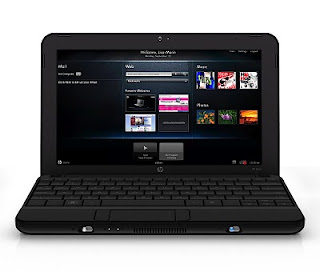 Model: HP Mini 110-1124TU ????? USB Flash Drive ??? Windows XP Service Pack 3 ????????????? ??????? ?????????????????? Memory Stick ????? Windows ??????????? ??????? Stick ??? Bootable Stick ?????????????? ???????????????????? ????????? ?????????-
(1) WinSetupFromUSB ??? Version 0.2.3 ??? Downlaod ??????????????????
(2) ????????? Program ??? ???????????? install ???????????????? ???????? ??????????????????? ???????? ??????????????
(3) WinSetupFromUSB ??? ???????????????? Microsoft ??? .net Framework ??? install ??????????? ????????????????
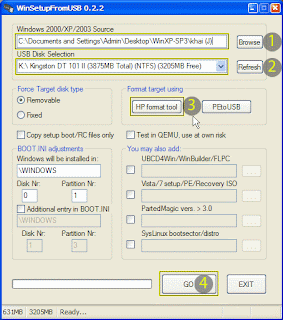
????????(?)?? Windows XP SP3 ????????? Windows ??????? ????????????????????? Folder ????? ??????????????? ????????????????????? ???????? Browse ??? Click ????????? copy ????????? windows ????? ????????? Location ??? ???????????????
????????(?)?? Windows ????????? ???????????? Memory Stick ??? ???????????? USB ????????? ???????????????? ???????? Refresh ??? Click ??????????????????????? ???????? ?????????????????? Memory Stick ??? ?????????? ????????????????
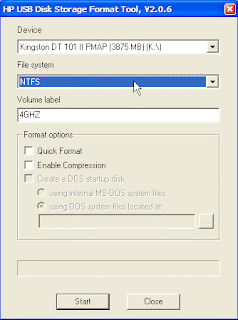
???????? (?) ?? ???????????????????? Memory Stick ?? format ??????????? NTFS format ????? ???????????? HP Format Tool ??? ???????????? NFFS File system ????????????? Format ?????????????
???????? (?) ?? ??????????????????????????????? Go ??? click ???????????????????????
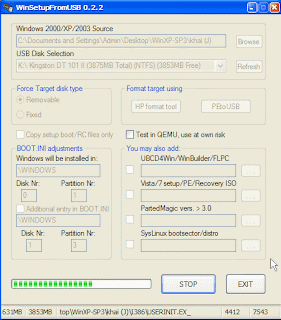
???????? Windows ??????????? Memory Stick ???????? ??????????????????????
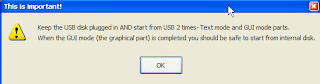
(4) ???????????? ????????????????????????-
(?) Windows ????????? ???????????? USB Port ??? ??????? Memory Stick ?????? ??????????????
(?) ???????????? Power button ??? ?????? ???????????? ?????????????
(?) ??????????????????? Bios Setup ?????? ????????????????????? F10 Key ??? ????????????? ???????? HP Mini 110 ??? Bios Setup Option ????? ???????????? ??????
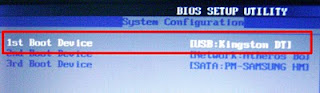
(4) Bios ??? System Configuration ??????? Boot Options ????? Enter Key ?????? ???????????
(5) ??????? 1st Boot Device ???????????? ??????? USB Device ???? ?????????????????? ?????????????- Keyboard ?? Esc Key ??? ????????????????????? ????????? F10 Key ??? ?????? Configuration ??? Save and exit ??????????? Yes ??????? highlight ????????????????? Enter ??? ?????? ???????????????????
???????? Windows ??????????? ??????????? step ????????? ???????????????? ??????????????????????? ?????????????? ??????? ????????????????
 ???????? Memory Stick ??? ???????????? CD/DVD Drive ?????? Windows XP Service Pack 3 ?????? ????????????? ?????????????????????????? ????????????? ????????????????
Ref: www.msfn.org
Available link for download
Tuesday, January 10, 2017
Happy New Year 2013 – Best Wishes from Prohack
Happy New Year 2013 – Best Wishes from Prohack
2012 was a formidable year : ] I was busy, in fact I have never been busier in my life and I find myself guilty of going into hibernation multiple times even when I didn’t wanted to. I promise 2013 will be the year of change , and I would dedicate myself over some newer interests and projects, this time, open source ones. I had enough of closed source pentest and scouting, nevertheless, It was an year where I -
- Completed multiple <unmentionable> targets at corp level. [4]
- Ran IOU on my laptop and simulated complete corporate cloud over it.
- Learnt and explored more about networks.
- Brokeup with my girlfriend : P
- and at last , resigned from Tulip Telecom to join Orange Business Services, a subsidiary of France Telecom. In fact I will be joining in early Jan 2013.
I hope Orange will be my home away from home and will open symbiotic and never before possible opportunities for me, and I am quite excited about it. I hope I will be able to take more time for my projects and share with you some exciting findings. When i look back at 2012, it was an year that taught me a lot of things, it was full of surprises and I hope 2013 will be an awesome year for all of us.
See you next mission and Stay Awesome .
Happy New Year 2013
Rishabh Dangwal
Available link for download
Tuesday, December 27, 2016
How To Profit From Flipping Domains Easy For Newbies course coupon Free
How To Profit From Flipping Domains Easy For Newbies course coupon Free
Making profits from domain names – $300-$400 startup budget.
Lectures 8
Video 1.5 hours
Skill Level All Levels
Languages English
Includes Lifetime access
30 day money back guarantee!
Available on iOS and Android
Certificate of Completion
How to profit from flipping domain names- Easy For Newbies.
This course has been designed for both newbies and experienced marketers who want to make a huge amount of money by flipping domain names. Premium domain names go for a lot of money – sometimes millions of dollars and in this course I would show you how to make such money without having to spend as much.
Who is this course for:
This course is for you if you are looking to make insane amounts of money online.
This is for you if you have a startup budget of $300-$400.
This is for you if you want to make money online flipping premium domains.
Course Structure: The course is compact, to the point and vey easy to understand. If you follow the steps and take action this will definitely make you some big money.
What is included in the course?
The course teaches you how to buy premium domains for less than $50/domain.
You will learn how to grab premium domains using an external service without having to spend time looking for premium domains.
You will learn how to flip the domains and make profit.
You will learn how to drive more traffic to your domain auctions.
Full details
Set up a profitable business selling domain names.
Buy premium domains for super cheap prices.
sell premium domains for heavy profits.
Full details
Anyone who wishes to make money online selling/flipping domain names should take this course.
Anyone who wants to make money online without having to spend too much time or money into the business.
Anyone who has a startup budget of $300-$400.
If you don’t have a startup budget of $300-$400 this course is not for you.
If you can’t wait ofr a domain to reach the right price, this business is not for you.
Full details
Angshuman Dutta coupons
Business course coupon
Home Business course coupon
How To Profit From Flipping Domains – Easy For Newbies
How To Profit From Flipping Domains – Easy For Newbies course coupon
How To Profit From Flipping Domains – Easy For Newbies coupon
Udemy coupons
Udemy coupon code
Udemy courses
free coupons
Udemy free courses
Udemy free coupon
Available link for download
Monday, December 19, 2016
How to get file from Android Emulor genymotion
How to get file from Android Emulor genymotion
How to get file from Android Emulor genymotion?
1: install Dropbox. >>Dropbox apk
2: install Root Brower apk. >>Root Browser Lite apk
3: open Root Browser.

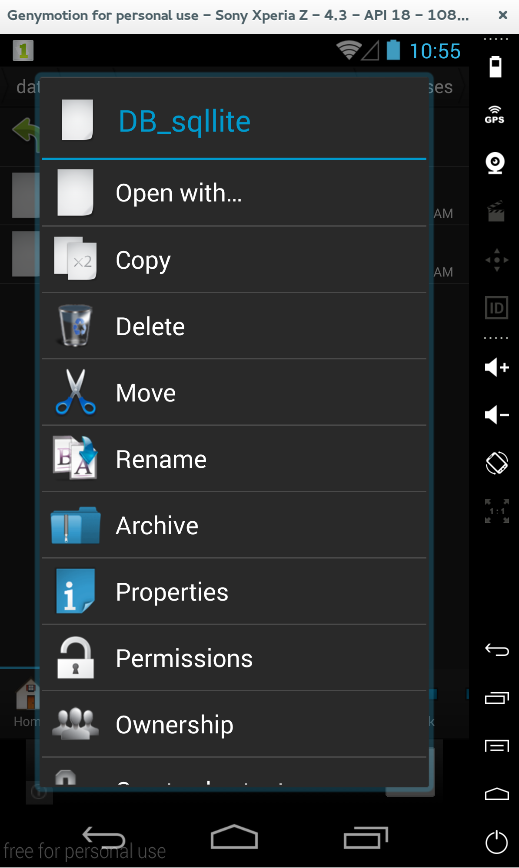

5. Open Dropbox. Select Upload Here:


Available link for download
Tuesday, December 6, 2016
How to Download Images From Instagram
How to Download Images From Instagram

Watch Video For Instructions
Download
Available link for download
Thursday, November 24, 2016
How to Download Books from Google
How to Download Books from Google
There are thousands of classic books available online in Google Book Search . But only few books are available with full preview as Google limits the usage of these books to read-only pages and cannot be downloaded for offline use.

But with Google Books Downloader you can download any Google book as PDF.Once the book has been checked in Google Book Downloader, by clicking Save entire book as... will convert the file to PDF format.In order to download, first open the "add book" dialog in the file menu ,then copy an paste the book code, link, or ISBN number, click search, and then select the book that shows up. Right click a title and hit "start."for downloading, and to export a file as a PDF, right-click and hit "export.".The application requires Microsoft .NET Framework 3.5 SP1
Download : GoogleBookDownloader Or From Softpedia
Firefox Add-on:Google Book Downloader 2.2.1| Google Books
Available link for download
Wednesday, November 9, 2016
How To Download From Servers
How To Download From Servers
and We will learn together how to download from servers
for example download golden wafi 1.12
from server
DepoSiteFiles
Click Here
first : click on "click here" OK
second : you will find this page
 click on words show "???? ??? ?????? ??? ???? ???????"
that words mean click here to enter download page
third : after click you will find this page
 click on words show "??? ?? ???"
this words mean download from here
fourth : after clicking you will find download page
DepoSiteFiles website and it is an english site and download
is easy now
Is there any difficulty ? If you encounter any difficulty write comment
((((((((((( ThAnK YoU FoR ViSiT Us )))))))))))
Available link for download
Thursday, October 27, 2016
How To Protect Mobile From Theft
How To Protect Mobile From Theft
Nowadays smart phone thefts become usual every city. If you are going in a way where there is huge crowd or if you are in a huge crowded local train. Or you may be waiting for a bus along with many guys like you. These are the places where your smart phone or mobile gets stolen. These are the places theives make their target.
Here is a tip for you to avoid smart phone theft. Dont laugh at me after reading this tip. You may get laugh, but it is the safest way to protect your mobile.
Tip:
Start the music player in your mobile and keep headphones in your ears then keep mobile in pocket. Keep listening to music until you come back to home or office from huge crowded places.
It may looks funny for you, but it works. Whenever you are not listening the song you can get the alert to mind that something happend to your mobile. Immediately you can catch the thief and get your mobile back.
Ha..ha..good tip right...??

Available link for download